
Why figures differ from Seller Central
Crateworth reads your data from Amazon, so most differences come from comparing two figures that are defined differently: a different date, a different idea of what counts as a sale, or a different exchange rate. Work through the reasons below for the figure you’re comparing.
Compare one marketplace and one period at a time. Choose the marketplace from All marketplaces on the Dashboard, and pick the matching report in Seller Central.
Why do daily totals differ near midnight?
Section titled “Why do daily totals differ near midnight?”Crateworth puts each order, fee and refund on the day it happened in the marketplace’s own local time: UK time for Amazon.co.uk, Pacific time for Amazon.com. The dates that Today and other Dashboard periods cover follow the Timezone in Settings.
A UK order’s day always runs from midnight to midnight UK time, whatever your Settings timezone; the Timezone only decides which date Today is. So if a single day’s totals differ, look at orders placed close to midnight: the Seller Central report may use a different time zone. With All marketplaces selected, each marketplace’s orders are on their own local days, so compare one marketplace at a time.
Why don’t Dashboard sales match the P&L, or my payments report?
Section titled “Why don’t Dashboard sales match the P&L, or my payments report?”Each page dates the same sale differently:
- The Dashboard counts a sale on the day it was ordered.
- The P&L counts a sale on the day it shipped. Until Crateworth has the shipment date, it uses the date Amazon posted the payment, or the order date if there isn’t one yet.
- Refunds, reimbursements and most other adjustments count on the day Amazon posted them.
So compare the Dashboard with Seller Central reports that go by order date, such as Business Reports, and the P&L with reports that go by posting date, such as the Payments date range reports. A refund lowers revenue in the period Amazon posts it, not the period of the original order.
Why are today’s sales or fees marked as estimated?
Section titled “Why are today’s sales or fees marked as estimated?”While an order is pending, Amazon doesn’t confirm its price. Crateworth shows the listing price, marked Est., until Amazon confirms the sale price in its next daily orders report.
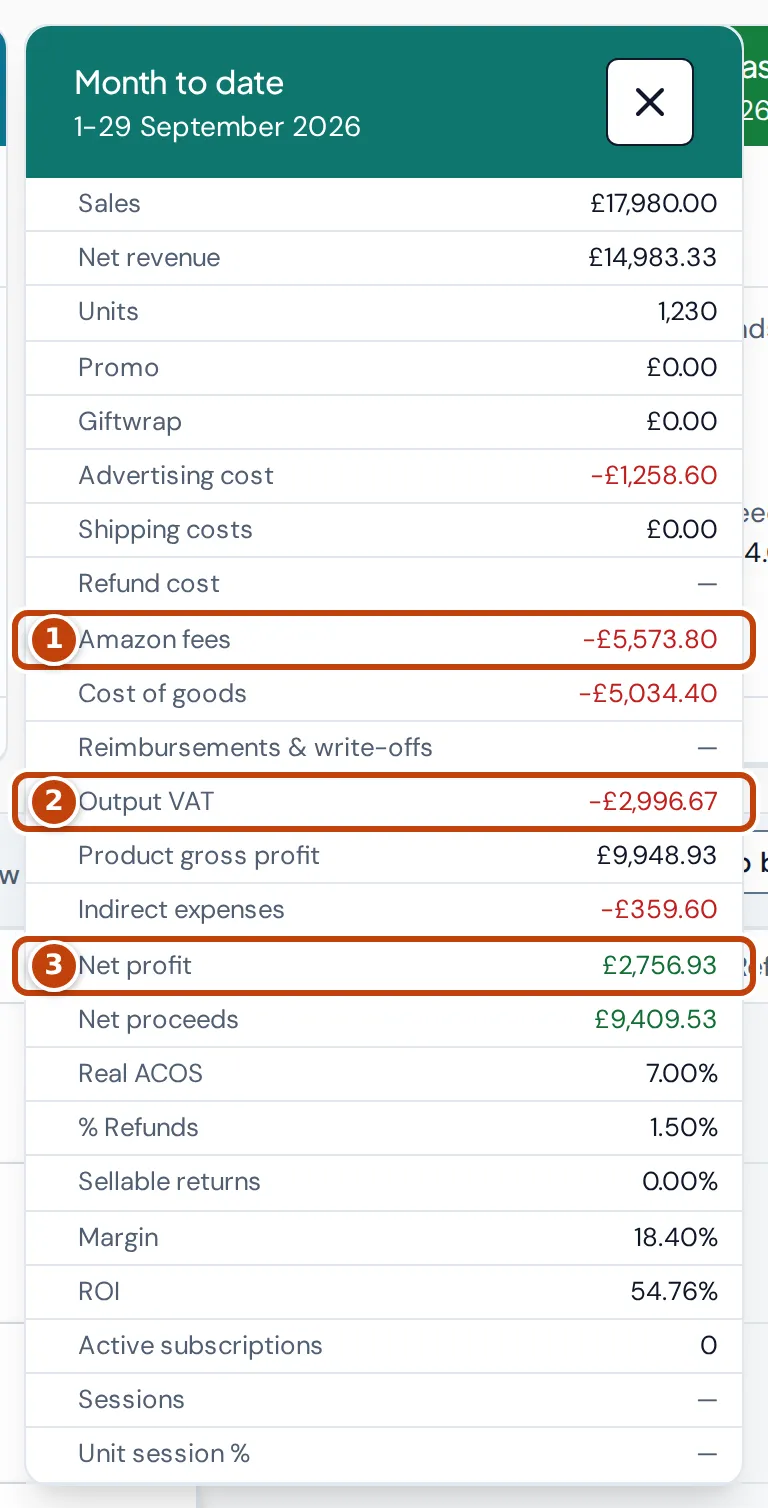
Amazon fees work the same way. Until Amazon charges the fee for an order, Crateworth uses Amazon’s fee estimate. When the charged fee is posted, it replaces the estimate. Expect recent days to move a little as this happens. To see how much of a period’s fees are still estimates, open More on a Dashboard card and expand Amazon fees marker 1: it splits into posted fees and Estimated fees.
Why are my Amazon fees lower than the Revenue Calculator?
Section titled “Why are my Amazon fees lower than the Revenue Calculator?”Amazon sometimes runs fee promotions that reduce the referral or FBA fee you’re charged. Crateworth uses the fee you’re actually charged, after the promotion, so it can be lower than a calculator that shows Amazon’s standard fee. For the referral fee, the product’s profit calculator in Crateworth shows both: switch between them with Use standard fee and Use promotional fee.
Why don’t my fee totals match Amazon’s statement?
Section titled “Why don’t my fee totals match Amazon’s statement?”Some settings change how Crateworth presents fees. Open the account menu (your name at the bottom of the sidebar), select Settings, then Calculation & VAT:
- Amortise Amazon fees daily spreads monthly fees, such as storage, evenly across the days of the month instead of putting them on the day Amazon charged them.
- Exclude inbound fee types leaves out the inbound fees you choose.
Freight and duty for Amazon Global Logistics shipments that you allocate to purchase orders, on the AGL allocations tab of the Supply pipeline page, become part of the products’ cost instead of Amazon fees.
What counts as a sale?
Section titled “What counts as a sale?”Crateworth’s Sales is what customers paid for the items, including any VAT in the price. It leaves out:
- shipping and gift wrap charges, which have their own figures;
- cancelled orders;
- orders fulfilled through Amazon for other sales channels (multi-channel fulfilment).
Promotions are taken off after sales, as their own figure. If you compare with Business Reports’ ordered product sales, check whether the Amazon figure includes VAT, shipping or pending orders for your marketplace.
Why do Amazon Vine units have no sales?
Section titled “Why do Amazon Vine units have no sales?”Amazon Vine gives products to reviewers at no charge. Crateworth counts Vine units as units sold, as Amazon does, but with no sales. Their FBA fees, Vine enrolment fee and cost of goods still count as costs. Vine order lines in Order items say so when you hover over them.
How is VAT treated?
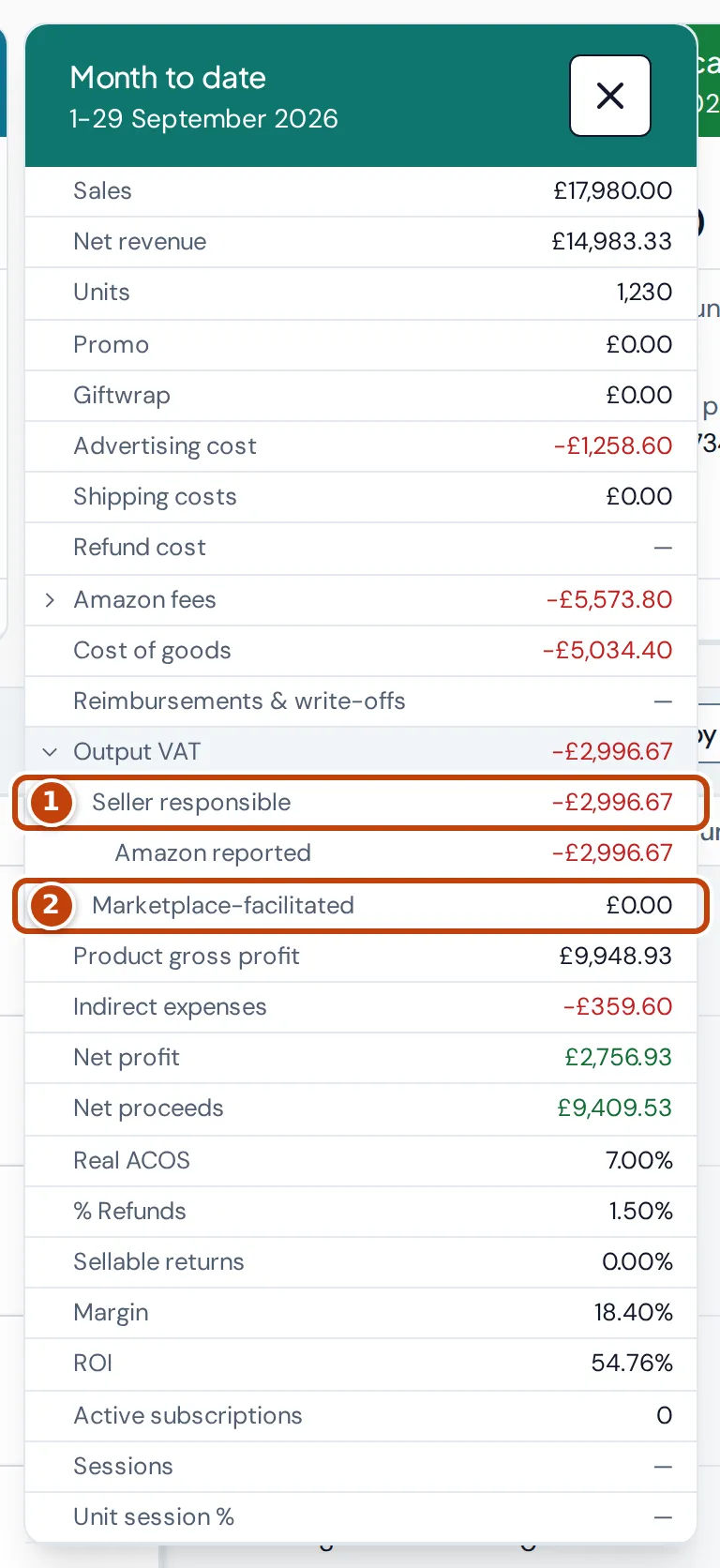
Section titled “How is VAT treated?”If you’re registered for VAT in a country, the VAT in your sales there is taken off revenue before profit. Outside your registered dates it isn’t. VAT that Amazon collects as a marketplace facilitator is taken off too, whether or not you’re registered. VAT on Amazon fees that you can reclaim is added back. On the Flat Rate Scheme, fee VAT isn’t reclaimable.
To see which is which, open More on a Dashboard card and expand Output VAT. Seller responsible marker 1 is the VAT you account for; Marketplace-facilitated marker 2 is the VAT Amazon collected.
So your profit depends on the VAT registrations you’ve added. Check them on the VAT page. The VAT page works to tax points for your returns, so its totals can differ from the P&L.
Why do totals in another currency differ from my payout?
Section titled “Why do totals in another currency differ from my payout?”Crateworth converts every figure into your reference currency at a published daily reference exchange rate for the day of the transaction. Amazon converts your payouts at its own rate, on the day it pays. The two rarely match exactly.
On the Payouts page, the smaller figure under Amount / converted is the amount Amazon converted for each payout. The total pending payout is converted by Crateworth.
Why is there a 1p difference?
Section titled “Why is there a 1p difference?”On orders with several units, Amazon’s settlement can differ from the order price by a penny. The Profit Flow tab on the Dashboard doesn’t draw differences under 5p and says so in a caption. Larger differences appear as Unreconciled revenue difference.
Why isn’t my profit what Amazon paid me?
Section titled “Why isn’t my profit what Amazon paid me?”Profit and net proceeds aren’t a payout forecast. They don’t follow Amazon’s settlement periods, reserves, balances carried between settlements, or the time a transfer takes to reach your bank. To match money received, use the Payouts page, which shows Amazon’s payout groups, transfer status and settlement windows.
Why is profit blank?
Section titled “Why is profit blank?”Crateworth leaves profit blank rather than guess when something it needs is missing: a product’s cost, a fee, a VAT rate, shipping or an exchange rate. Add the missing cost or VAT rate and the figure fills in. See Dashboard: why a figure is estimated, blank or “Unresolved”.
Why does my stock differ from Manage FBA Inventory?
Section titled “Why does my stock differ from Manage FBA Inventory?”The stock on the Dashboard, FBA on-hand, is Amazon’s live available quantity: units ready to sell. Reserved, unfulfillable, researching and inbound units aren’t included. When Amazon shows the same stock in several marketplaces, as it does for Pan-European FBA and Remote Fulfilment, Crateworth counts the units once.
For the other quantities, in the sidebar, under Inventory, select Overview. It shows Available and Amazon inbound, and each product’s page breaks down units in customer orders, in transfer between fulfilment centres, being researched and unsellable.
Is Crateworth up to date?
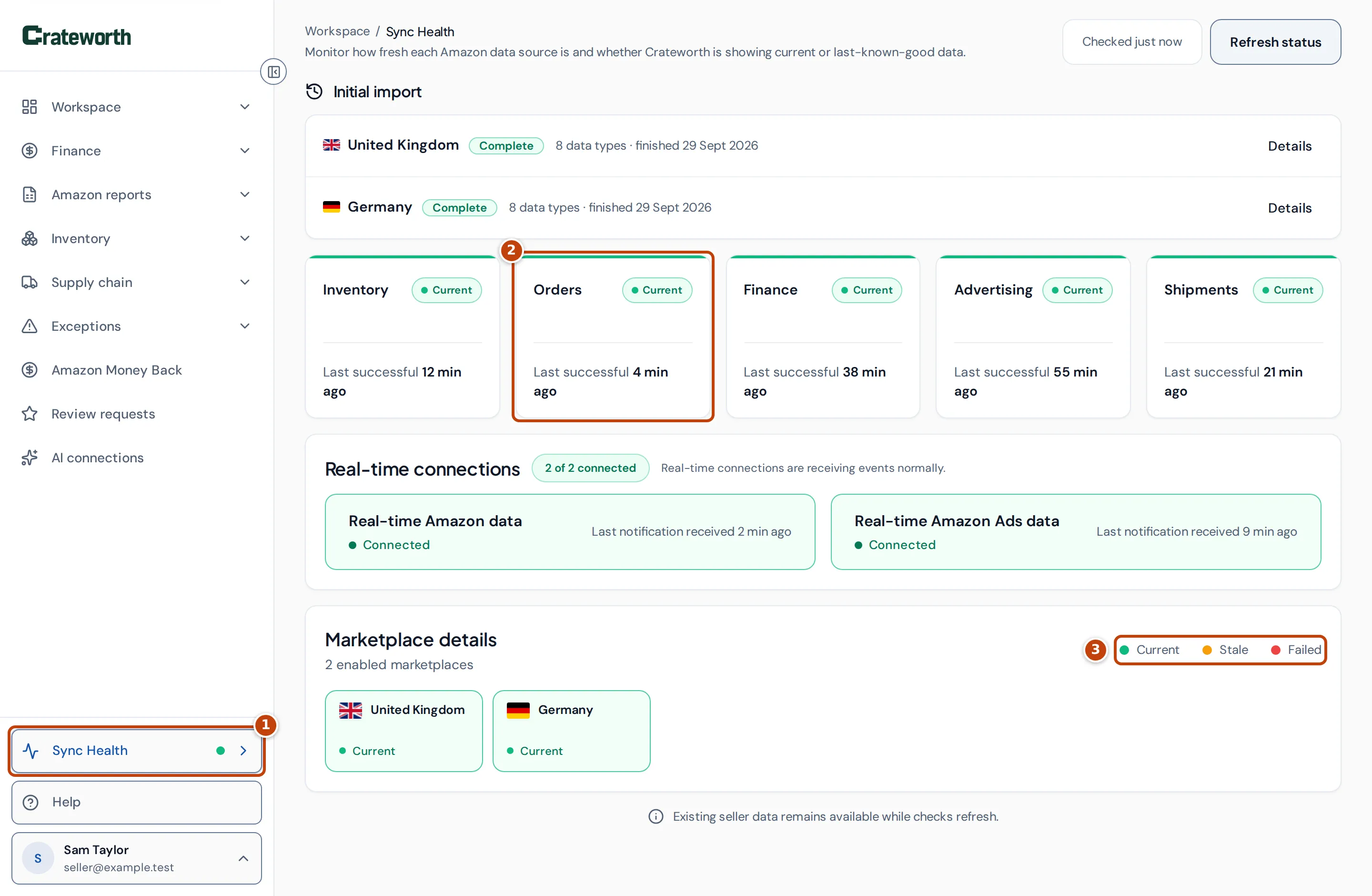
Section titled “Is Crateworth up to date?”Each kind of Amazon data arrives on its own schedule. Sync Health marker 1, at the bottom of the sidebar, shows whether orders, finances, inventory, advertising and shipments are up to date. Each source has its own card marker 2 with its status and when it last updated successfully: Current, Stale or Failed marker 3. If a source is stale, recent figures from it may be missing. See Sync Health.
Crateworth also imports only the marketplaces you turned on, and about two years of history. Check which marketplaces sync in Settings, under Amazon accounts, with Sync this marketplace.