
Removals
The Removals page lists two kinds of Amazon event in one table: removal orders (stock you asked Amazon to return to you or dispose of) and FBA reimbursements (money or stock Amazon gave back for lost, damaged or returned units). Use it to check what’s been removed, what it cost, and what Amazon has paid you. To open it, in the sidebar, under Amazon reports, select Removals.
What’s on the Removals page
Section titled “What’s on the Removals page”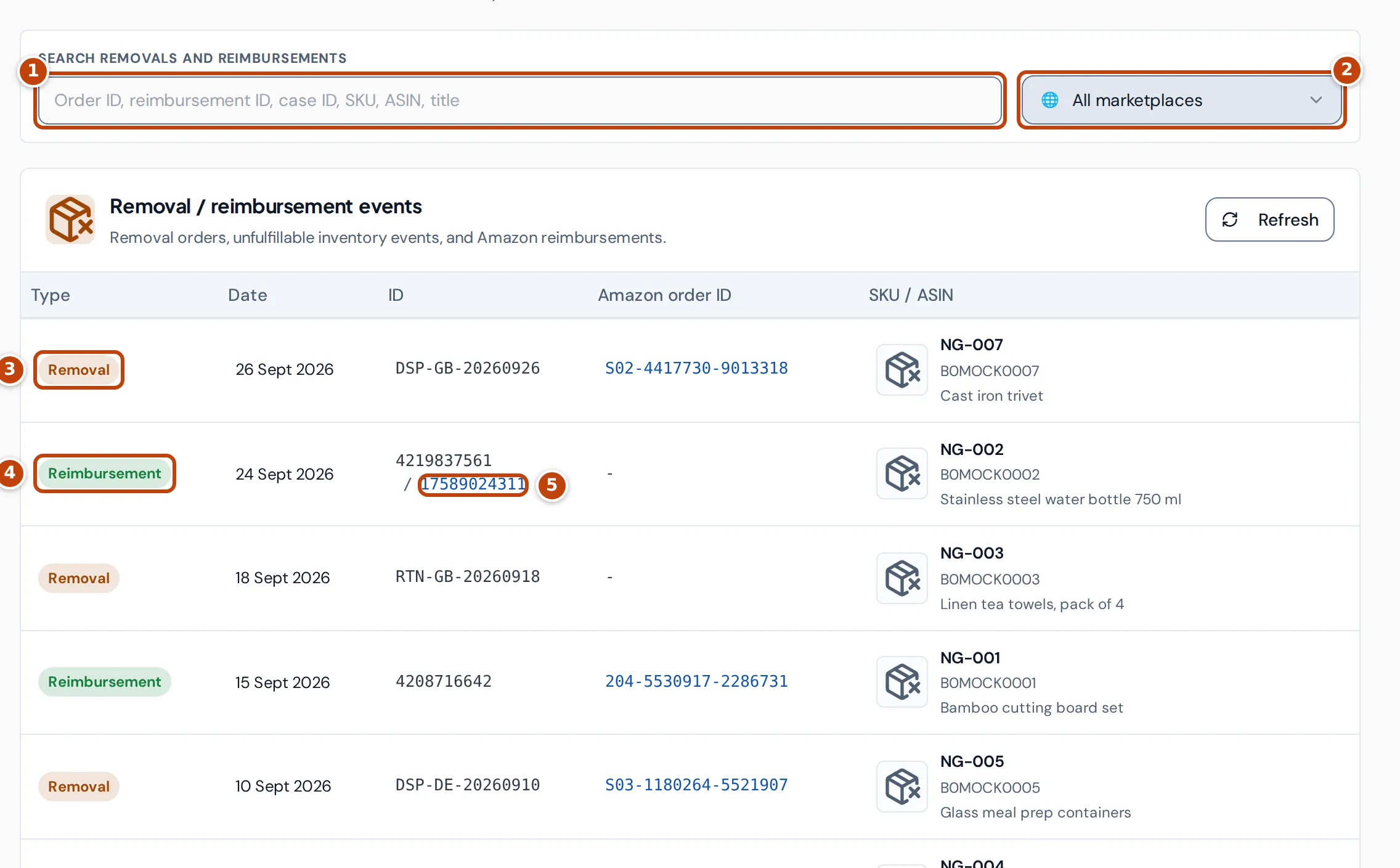
Along the top:
- marker 1 The search box finds events by order ID, reimbursement ID, case ID, SKU, ASIN, product title, or the reason or disposition. Clear empties it.
- marker 2 All marketplaces chooses one marketplace, or all of them.
Below is the Removal / reimbursement events table, newest first. Refresh reloads it. Each row has a Type:
- marker 3 Removal is one product line of a removal order.
- marker 4 Reimbursement is one reimbursement from Amazon.
The ID column shows the removal order ID for a removal. For a reimbursement it shows the reimbursement ID, then marker 5 the case ID when there is one. The case ID links to that case in Seller Central. Amazon order ID links to the order in Seller Central.
Select a product in the SKU / ASIN column to open that product’s inventory page.
The table shows 25 rows at a time. Use Previous and Next to move between pages. You can drag a column heading to reorder the columns, and drag a heading’s edge to change its width.
Quantities, fees and amounts
Section titled “Quantities, fees and amounts”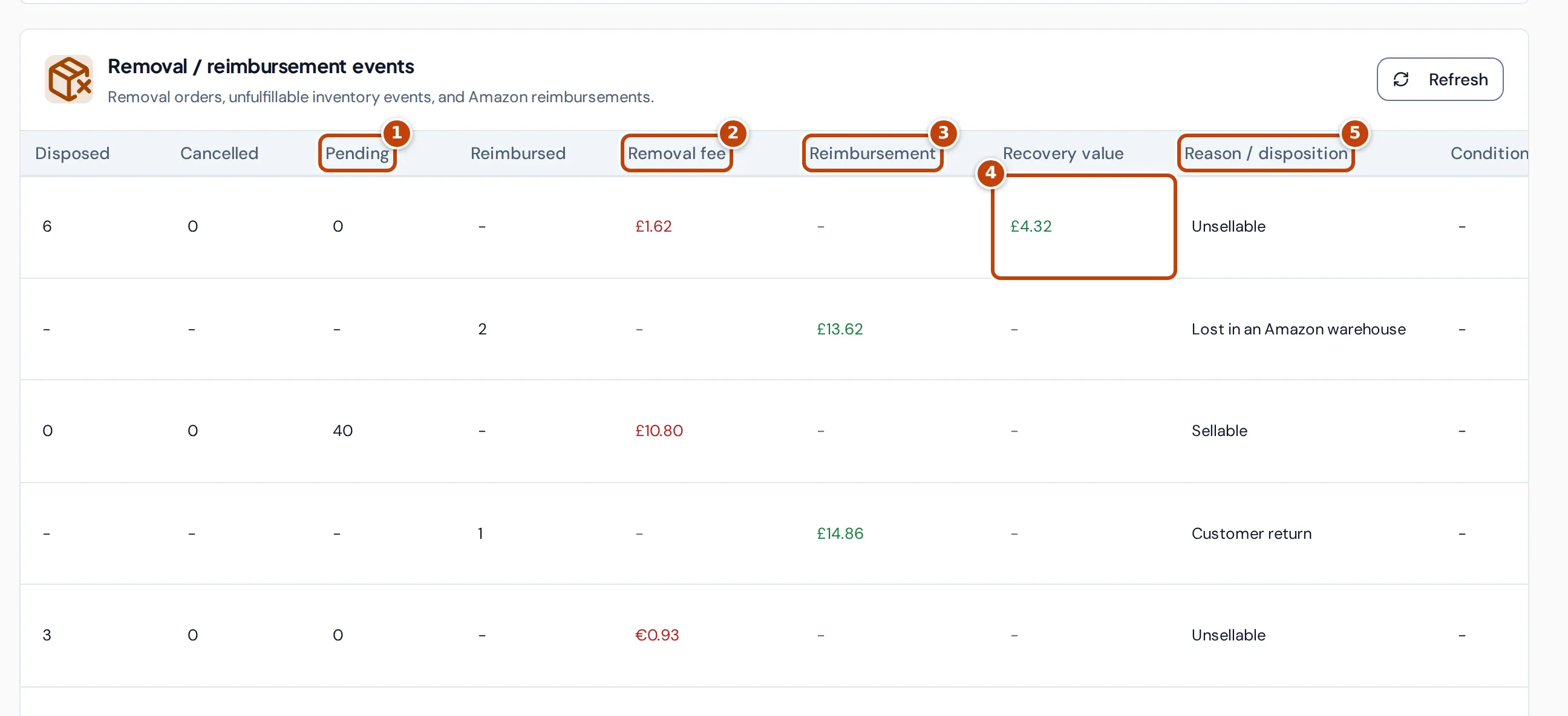
Scroll the table to the right to see these columns. Removal columns show a dash on reimbursement rows, and the other way round.
| Column | What it shows |
|---|---|
| Disposed | Units Amazon has disposed of for this removal order line. |
| Cancelled | Units cancelled from the removal order. |
| Pending marker 1 | Units Amazon is still processing. |
| Reimbursed | Units covered by the reimbursement, paid in cash or replaced with stock. |
| Removal fee marker 2 | Amazon’s fee for the removal order line, in the marketplace currency. Fees show in red because they’re a cost. |
| Reimbursement marker 3 | The amount Amazon reimbursed, shown in green. |
| Recovery value marker 4 | An estimate of the cost you recover from disposed units. See Recovery value. |
| Reason / disposition marker 5 | For a removal, Amazon’s disposition, such as Sellable or Unsellable. For a reimbursement, Amazon’s reason, such as Lost in an Amazon warehouse or Damaged in an Amazon warehouse. Hover over a reason to see Amazon’s code for it, such as Lost_Warehouse. |
| Condition | The item condition Amazon gives on a reimbursement. |
| Status | The removal order status as Amazon reports it, such as Pending, Completed or Cancelled. Reimbursements show Approved. |
Recovery value
Section titled “Recovery value”Recovery value estimates how much of a product’s cost you get back when Amazon disposes of its unsellable units. It’s the disposed units × the product’s cost × the product’s Unsellable recovery percentage. Hover over an amount for a short explanation.
The percentage is set per product on the Product settings page, under Inventory in the sidebar. While a product’s percentage is 0, its removals show a dash here. See Product settings.
Find a removal or reimbursement
Section titled “Find a removal or reimbursement”- In the search box, enter the removal order ID, reimbursement ID, case ID, SKU, ASIN or part of the product title. You can also search the Reason / disposition text as the table shows it, such as “lost in an Amazon warehouse” or “unsellable”, or Amazon’s reason code, such as Lost_Warehouse. For a reimbursement, the Amazon order ID works too. The table updates as you type.
- Optional: choose a marketplace from All marketplaces.
- To open the case or order in Seller Central, select the case ID or Amazon order ID link.
Where the figures come from
Section titled “Where the figures come from”- Removal rows come from Amazon’s removal order detail report. The date is the date the removal was requested, and the quantities, fee and status are Amazon’s, updated each time Crateworth reads the report.
- Reimbursement rows come from Amazon’s FBA reimbursements report, and include every reimbursement reason, not only removals. The date is the date Amazon approved the reimbursement.
- Amounts are in the marketplace’s own currency, so a Germany removal shows euros.
- For a removal, Amazon order ID is the Amazon order Crateworth matched to the removal, by the same product on the same day. It can be blank when no order matched.
Why a figure looks wrong or blank
Section titled “Why a figure looks wrong or blank”A completed return order shows 0 everywhere
Section titled “A completed return order shows 0 everywhere”The table has no column for units Amazon has shipped back to you. A removal order to return stock to you can show 0 under Disposed, Cancelled and Pending once Amazon has shipped it. Check the Status column, or the order in Seller Central.
The removal fee says “Not synced”
Section titled “The removal fee says “Not synced””Not synced means Crateworth has no fee for that removal. It appears on older removals that Crateworth worked out from your order history before it read Amazon’s removal report. A removal from the report with no fee shows a zero amount instead.
A reimbursement isn’t for a removal
Section titled “A reimbursement isn’t for a removal”The page lists every FBA reimbursement, including units lost or damaged in Amazon’s warehouses and customer returns that weren’t received back. Use the Reason / disposition column to see one kind, or search for the reason, such as “customer return” or “damaged in an Amazon warehouse”.
“No removal or reimbursement events found.”
Section titled ““No removal or reimbursement events found.””Amazon hasn’t reported any removals or reimbursements for the marketplace and search you chose. Clear the search and choose All marketplaces.
“Failed to load removal and reimbursement events.”
Section titled ““Failed to load removal and reimbursement events.””The table couldn’t load. Select Retry events to try again.
Related pages
Section titled “Related pages”- Returns shows customer refunds and what happened to the returned units.
- Inventory health shows which products Amazon suggests removing because of excess or aged stock.
- Amazon Money Back finds reimbursements Amazon may still owe you.