
Storage utilisation
The Storage utilisation page shows how many weeks of stock you hold at Amazon for the rate you sell it, per marketplace and size tier. Amazon charges a storage utilisation surcharge when this ratio is too high, so the page tells you which marketplaces are at risk. To open it, in the sidebar, under Amazon reports, select Storage utilisation.
What the storage utilisation ratio means
Section titled “What the storage utilisation ratio means”The storage utilisation ratio is how many weeks your FBA stock would last at your average shipping rate. It’s your average daily inventory volume divided by your average daily shipped volume, in weeks. Both are volumes, not units.
Amazon works it out for each size tier, Standard-size and Oversize. If the ratio is above the surcharge threshold on the last day of the month (22 weeks on the UK and EU rate cards), inventory stored during that month can incur a storage utilisation surcharge. The surcharge is charged per cubic foot or cubic metre, at a rate that rises with the ratio.
Compare your marketplaces
Section titled “Compare your marketplaces”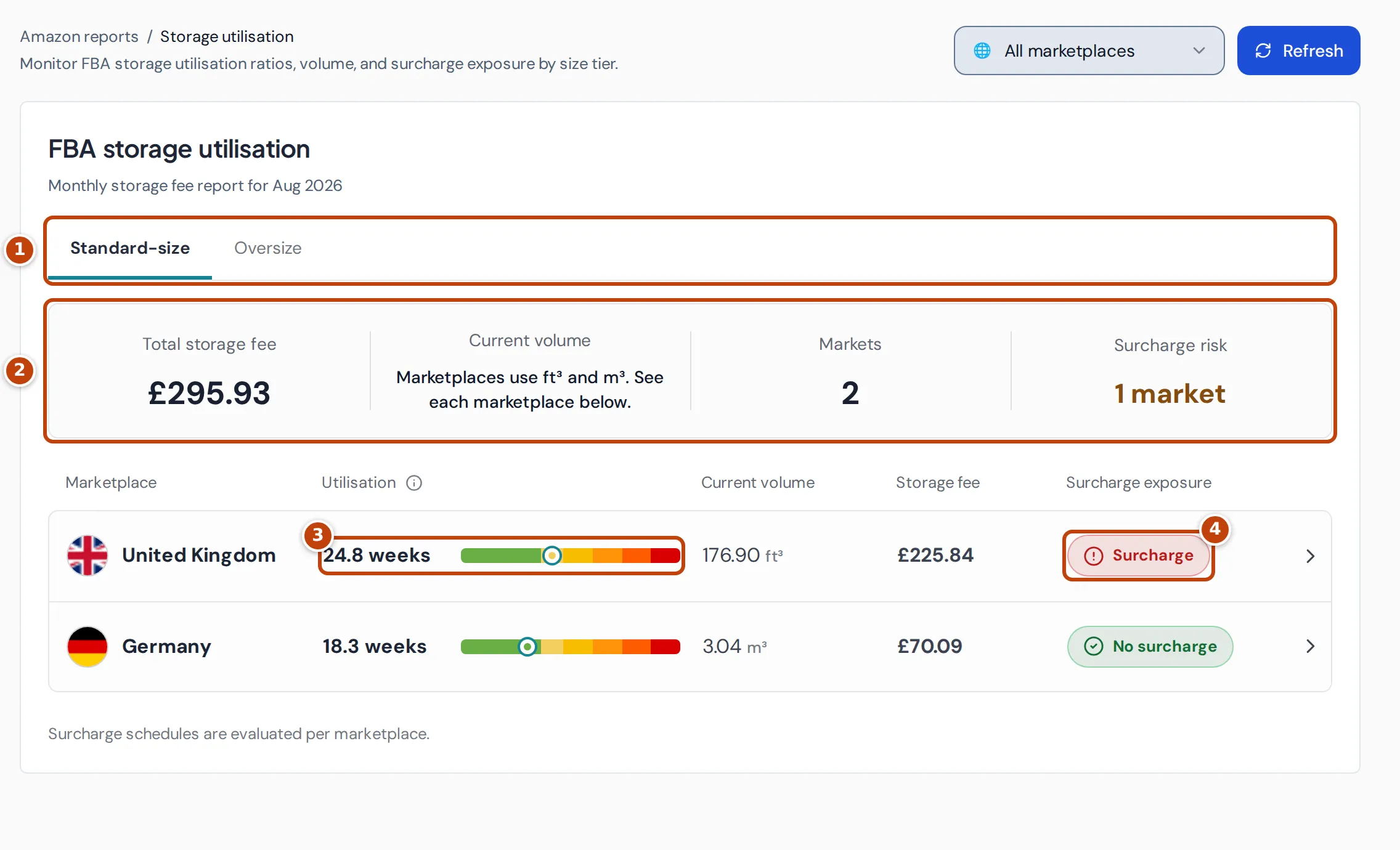
With All marketplaces selected, the page compares your marketplaces for one size tier. marker 1 Choose the tier with Standard-size or Oversize.
marker 2 The summary shows:
- Total storage fee: your storage fees for the tier in the latest monthly report, across marketplaces, in your reference currency.
- Current volume: the volume of the tier in stock now. When marketplaces measure volume in different units, such as cubic feet (ft³) in the UK and cubic metres (m³) in the EU, it names the units instead of adding them up, and each marketplace’s row shows its own volume.
- Markets: the number of marketplaces with storage data.
- Surcharge risk: how many marketplaces are above their surcharge threshold.
Each marketplace row shows its ratio as marker 3 Utilisation, with a bar coloured by Amazon’s surcharge bands and a marker at your ratio. It also shows the current volume, the storage fee and marker 4 Surcharge exposure:
- Surcharge: the ratio is above the threshold for that marketplace.
- No surcharge: the ratio is below it.
- Unavailable: there’s no ratio, or Crateworth has no verified Amazon surcharge rates for that marketplace.
Select a row to open that marketplace.
Check one marketplace
Section titled “Check one marketplace”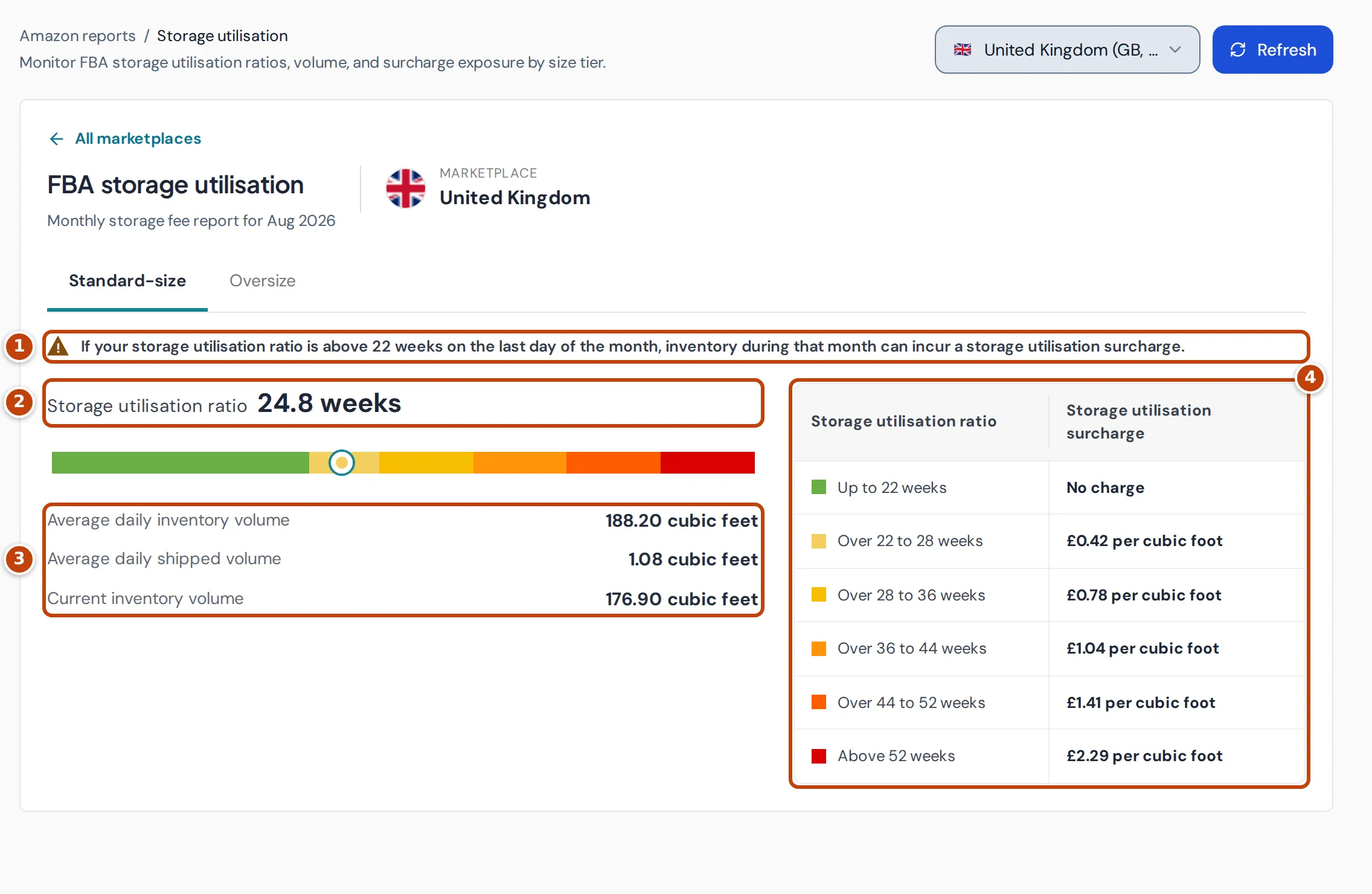
Choose a marketplace from the selector at the top, or select its row. All marketplaces above the title goes back to the comparison.
- marker 1 The warning gives the threshold for that marketplace and size tier. It’s highlighted when your ratio is above it.
- marker 2 Storage utilisation ratio is your ratio in weeks. The bar shows where it falls in Amazon’s surcharge bands.
- marker 3 The volumes behind the ratio: Average daily inventory volume, Average daily shipped volume and Current inventory volume, in cubic feet or cubic metres.
- marker 4 The surcharge table lists each band and its rate per cubic foot or cubic metre, from Amazon’s published rate card.
Lower your ratio before month end
Section titled “Lower your ratio before month end”- Select All marketplaces and look for Surcharge under Surcharge exposure.
- Select that marketplace and check how far the ratio is above the threshold.
- Open Inventory health, choose the marketplace and select Excess to find the slow sellers taking up space.
- Reduce that stock before the last day of the month, for example with a removal order or by holding back new shipments.
Where the figures come from
Section titled “Where the figures come from”- Monthly report: when Amazon’s monthly storage fee report is available, the page shows its ratio and fees for the latest month. The line under the title then reads “Monthly storage fee report for” and the month, such as Aug 2026.
- Current estimate: before a monthly report is available, Crateworth estimates the ratio from Amazon’s daily inventory planning reports over the last 13 weeks: average stock volume divided by the volume shipped in the last 90 days. The line under the title then reads “Current inventory estimate from” and a date.
- Current inventory volume always comes from the latest inventory planning report.
- Rates: surcharge bands come only from Amazon rate cards Crateworth has checked, for the period of the report. Verified rates cover marketplaces such as the UK, Germany, France, Italy and Spain.
- Storage fees are converted into your reference currency.
Why the page is empty or the schedule is missing
Section titled “Why the page is empty or the schedule is missing”“Storage utilisation will appear after the next inventory planning report…”
Section titled ““Storage utilisation will appear after the next inventory planning report…””Crateworth has no volume data from Amazon yet. The page fills in after the next inventory planning report that includes volumes, and the next monthly storage fee report.
“Monthly report unavailable for this selection.”
Section titled ““Monthly report unavailable for this selection.””There’s no monthly storage fee report for this marketplace and tier yet, so the ratio is the rolling estimate. If it also says the 13-week lookback is still filling in, the estimate is based on fewer days and can move as more days arrive.
“Verified surcharge schedule unavailable”
Section titled ““Verified surcharge schedule unavailable””Crateworth shows surcharge bands only where it has checked Amazon’s published rates:
- For some marketplaces, Amazon doesn’t publish a rate table Crateworth can verify.
- No checked rate card covers the month of the report.
The ratio and volumes still show; only the bands and the surcharge check are missing.
Related pages
Section titled “Related pages”- Inventory health shows excess and aged stock by product.
- Removals shows removal orders and their fees.