
Freight rates
The Freight rates page lists the freight prices Crateworth has stored for sea and air routes, from origin ports and supplier pickups to destination ports and Amazon markets, so you can compare them and see what the replenishment planner can use. You can also save your own forwarder’s price for a planning route. To open it, go to Replenishment planning (in the sidebar, under Supply chain) and select Freight rates beside Manage products. Back to replenishment planner takes you back.
What’s on the Freight rates page
Section titled “What’s on the Freight rates page”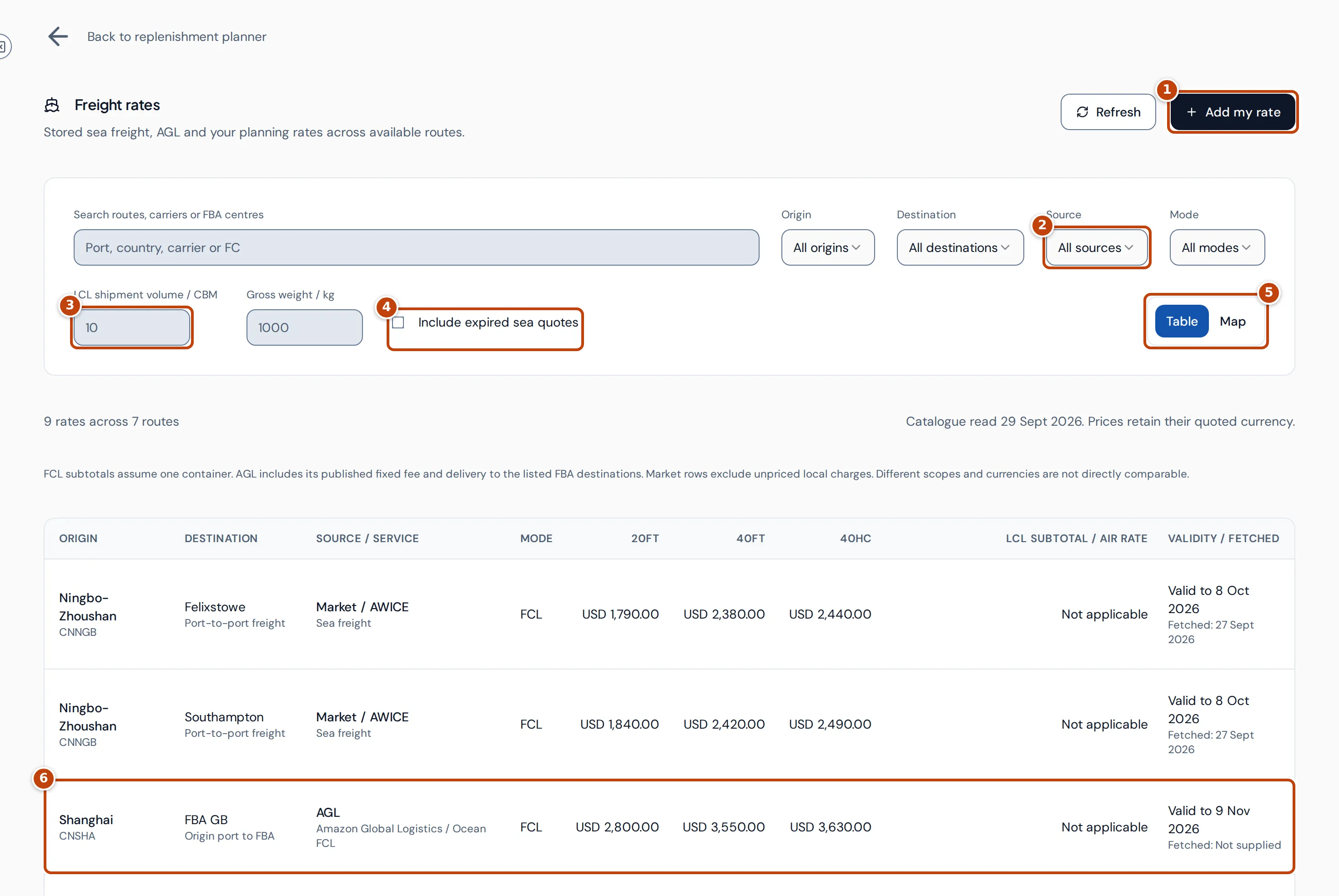
At the top, marker 1 Add my rate saves your own price for a planning route, and Refresh reloads the rates.
The filters narrow the list:
- Search routes, carriers or FBA centres finds a port, country, carrier or fulfilment centre code.
- Origin and Destination choose a port or Amazon market.
- marker 2 Source chooses where the rates come from, and Mode chooses FCL (full container), LCL (shared container) or Air.
- marker 3 LCL shipment volume / CBM and Gross weight / kg describe your shipment, so LCL rows can show what it would cost. They start at 10 CBM and 1,000 kg.
- marker 4 Include expired sea quotes also lists rates that have expired or aren’t valid yet. They’re hidden by default.
- marker 5 Table and Map switch between the list and a map of the routes. The map’s points are representative locations for each port or Amazon market, not shipping routes or fulfilment centre addresses.
Under the filters, the page counts the rates and routes shown and says when the stored rates were read. Prices stay in the currency they were quoted in, so rows in different currencies aren’t directly comparable.
Where the rates come from
Section titled “Where the rates come from”Each row’s Source / service column shows its source:
| Source | What it is |
|---|---|
| AGL | Amazon Global Logistics published estimates, from an origin port to an Amazon market (shown as, for example, FBA GB), for the listed fulfilment centres and cargo category. FCL, LCL and air. Not a booking quote. |
| Market / AWICE | Market sea freight estimates from port to port, FCL and LCL. Origin, destination and other local charges may apply on top. |
| SEND | Air freight estimates from a supplier pickup to an Amazon market, with pickup charges priced separately. |
| My rate | Your own price for one of your planning routes, labelled Using your rate. |
The rates are stored prices. Opening the page doesn’t ask any carrier for a new quote.
How the table’s prices are worked out
Section titled “How the table’s prices are worked out”The 20ft, 40ft and 40HC columns marker 6 are the price of one container of that size. For AGL they include AGL’s published fixed fee per shipment. Unpriced extra charges aren’t included. Rows that aren’t FCL show Not applicable.
LCL subtotal / Air rate depends on the row’s mode:
- LCL rows show the cost of the shipment you entered. Shared-container freight is charged on the larger of the volume and the weight converted to volume (weight/measurement, W/M), using the rate’s own rule, for example 1,000 kg per CBM. The page uses the larger of your CBM, your weight converted to CBM and the rate’s minimum charge, multiplies it by the price for that size band, and adds any fixed fee. Your own rates are charged on CBM only.
- Air rows show the price per kg for the highest weight bracket. Pickup and fees are extra.
Validity / fetched shows when the rate expires (Valid to), Expired, Not yet valid or No expiry supplied, and when Crateworth fetched it.
When an LCL subtotal can’t be worked out, the cell says why, for example that no single price band fits the shipment size or that the rate’s weight rule wasn’t supplied.
See the detail for a route
Section titled “See the detail for a route”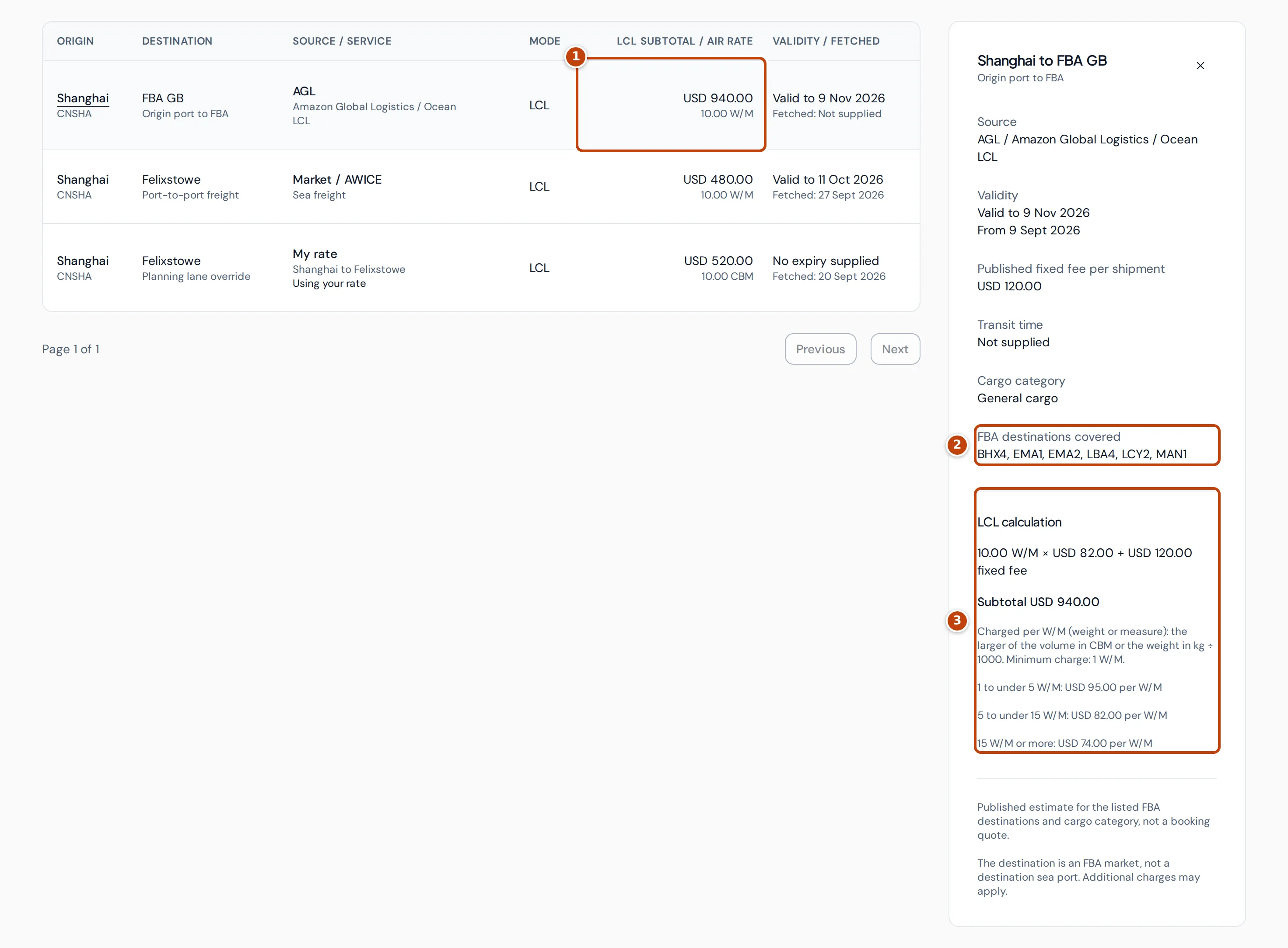
Select a row’s origin name to open its detail on the right. marker 1 In this example, the AGL LCL rate costs USD 940.00 for a 10 CBM, 1,000 kg shipment. The detail panel shows:
- Source, Validity, Published fixed fee per shipment and Transit time (Not supplied when the source gives none), and the Cargo category where there is one;
- marker 2 FBA destinations covered, for AGL rates;
- marker 3 the calculation behind the subtotal: LCL calculation for LCL, One-container subtotal for FCL, or Published air brackets for air;
- notes on what the price includes.
When one route has several offers, choose between them in Available offers.
Add your own rate for a planning route
Section titled “Add your own rate for a planning route”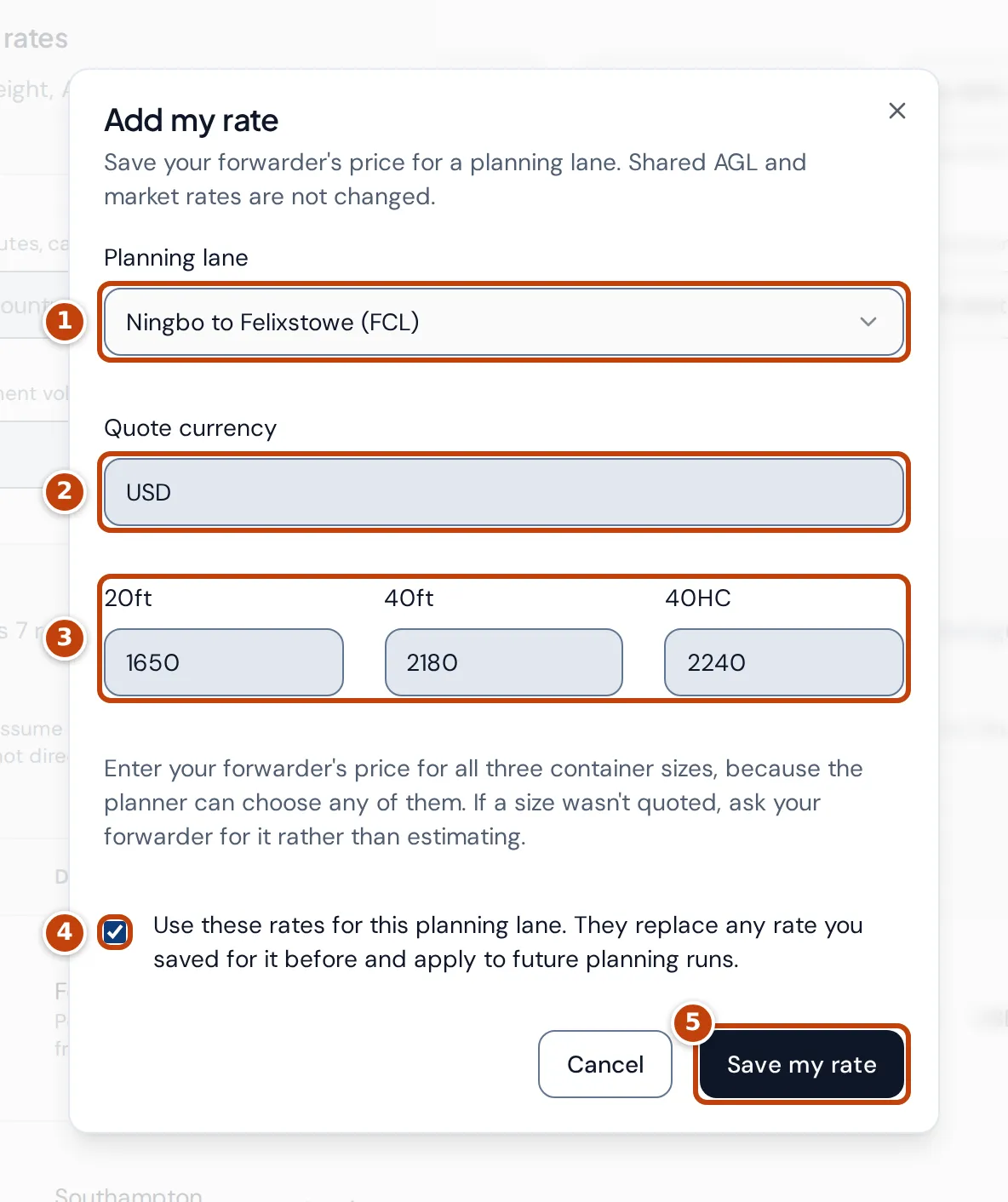
If your forwarder has quoted you a price, save it on the planning route so plans use it instead of an estimate. You need a sea route set up in Replenishment planning first; until then the page says to set up an ocean lane in the planner. Your rate applies to that planning route only, and the shared AGL and market rates don’t change.
- Select Add my rate.
- Choose the route in marker 1 Planning lane.
- Enter the marker 2 Quote currency as a three-letter code, such as USD or GBP.
- Enter the price marker 3. For an FCL route, enter all three container prices, 20ft, 40ft and 40HC. For an LCL route, enter the LCL price per CBM. LCL rates you save are charged by volume only, so don’t enter a weight/measurement price unless it’s also right per CBM for your goods.
- Tick the confirmation marker 4. Saving replaces any rate already saved for that route.
- Select marker 5 Save my rate.
The new rate is used by future planning runs. Plans already made aren’t recalculated.
To change your rate, open its row and select Edit my rate. To go back to the estimate, select Use market estimate, then Remove override. Future plans then use the route’s available estimate.
Why a rate or price is missing
Section titled “Why a rate or price is missing”- No rates match these filters: try another route, source or mode, or tick Include expired sea quotes.
- No rate in a container column: the rate has no price for that size, or an AGL rate has no published fixed fee.
- Add my rate is greyed out: you have no sea route in Replenishment planning yet. If the button isn’t shown at all, you need edit access to both inventory and profit.
- An LCL subtotal shows a reason instead of a price: enter a volume above zero, or check that the shipment size falls inside one of the rate’s price bands.