
Profit calculator
The Profit calculator works out what one product earns per unit at a selling price you choose. It starts from Amazon’s fee estimate, your costs, VAT settings and refund history, and you can change any figure. Nothing you enter changes your reported profit, apart from tax settings you choose to save.
Open the Profit calculator
Section titled “Open the Profit calculator”- In the sidebar, under Inventory, select Overview.
- Select the product’s row. Its inventory details page opens (see Inventory overview).
- Select Profit at the top of the page. The Profit calculator opens on the marketplace chosen on the details page.
You can also open it from the product table on the Dashboard: point at a product’s row and select the calculator icon.
Figures recalculate a moment after each change.
What’s in the Profit calculator
Section titled “What’s in the Profit calculator”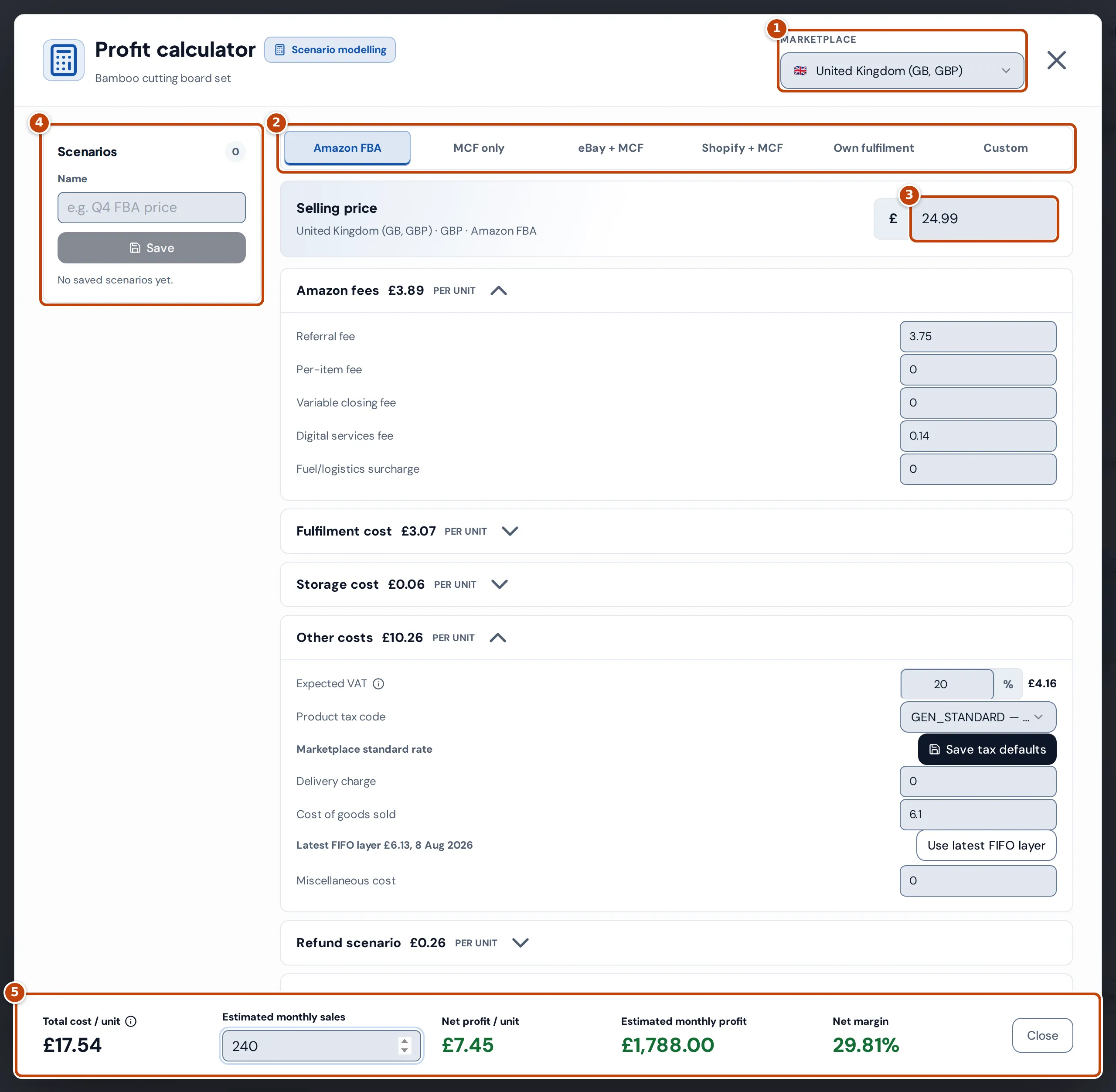
- Marketplace marker 1 chooses which of the product’s listings to work from. Changing it reloads that listing’s price, fees, currency and VAT, replacing any figures you’ve typed.
- The channel tabs marker 2 choose how the product is sold; see Model another sales channel.
- Selling price marker 3 starts at the listing’s current price, including VAT. Changing it re-estimates Amazon’s fees; see When you change the selling price.
- Scenarios marker 4 keeps named sets of figures in this browser.
- The footer marker 5 shows the profit per unit and per month.
Each cost panel shows its per-unit total in the heading; select the heading to open or close it.
Amazon fees
Section titled “Amazon fees”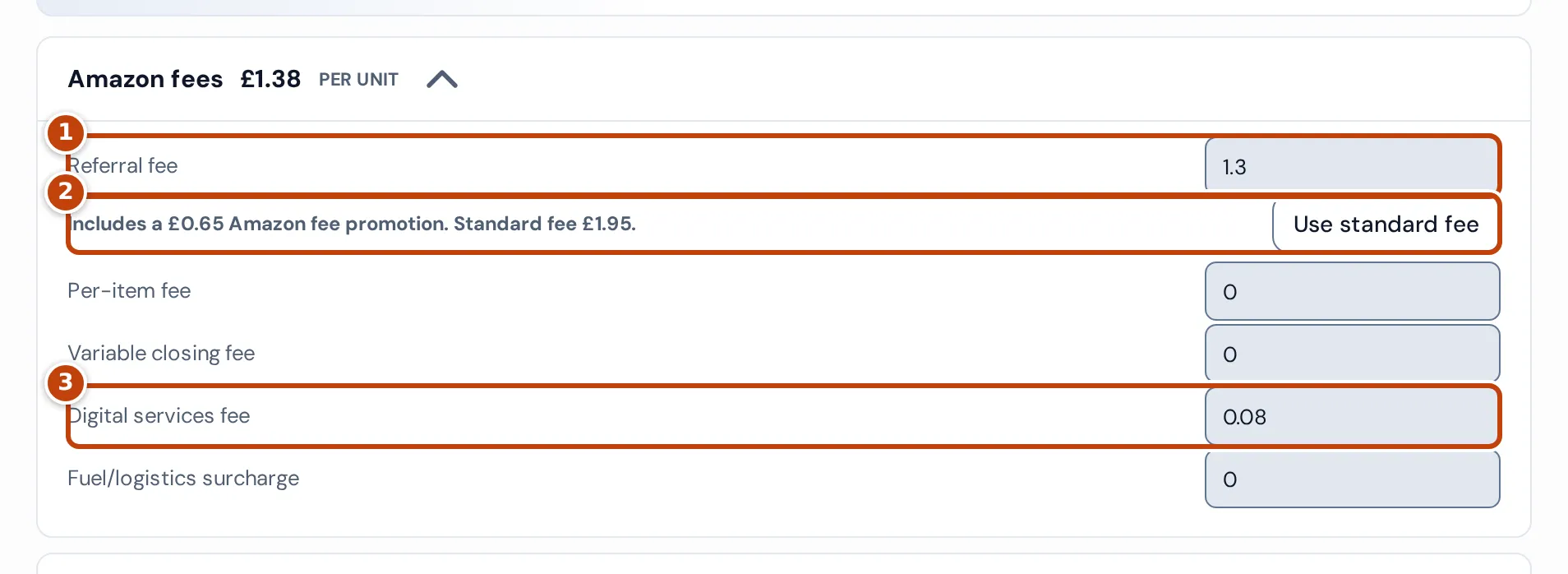
On the Amazon FBA tab, the Amazon fees panel holds Amazon’s selling fees per unit. Referral fee marker 1 and the others start from Amazon’s current fee estimate for the listing, as used on Product settings, or 0 when the estimate has no such fee. The FBA fulfilment fee is under Fulfilment cost.
Digital services fee marker 3 uses Amazon’s figure when the estimate has one. Otherwise, in the UK marketplace, it’s 2% of the referral, per-item, variable closing and FBA fulfilment fees, rounded up to the penny, and follows those fees until you type your own figure. Elsewhere it starts at 0.
When the referral fee includes a temporary Amazon fee promotion, a note marker 2 gives the discount and the standard fee. It starts with the promotional fee; select Use standard fee to see the profit once the promotion ends, and Use promotional fee to go back.
When you change the selling price
Section titled “When you change the selling price”On the Amazon FBA tab, a moment after you stop typing a new Selling price, the calculator asks Amazon for a fee estimate at that price. It replaces Referral fee, Per-item fee, Variable closing fee and FBA fulfilment fee with Amazon’s figures, including any you typed, and the fee promotion note follows the new estimate. Digital services fee and Fuel/logistics surcharge change only when Amazon returns them. Profit recalculates at the new price straight away and again once the new fees arrive.
Under Selling price, “Updating Amazon fees for this price…” shows while Crateworth waits for Amazon. If Amazon doesn’t return an estimate, the fees already shown stay and the note says “Amazon fees couldn’t be updated for this price, so the previous fees are kept.”
Storage cost
Section titled “Storage cost”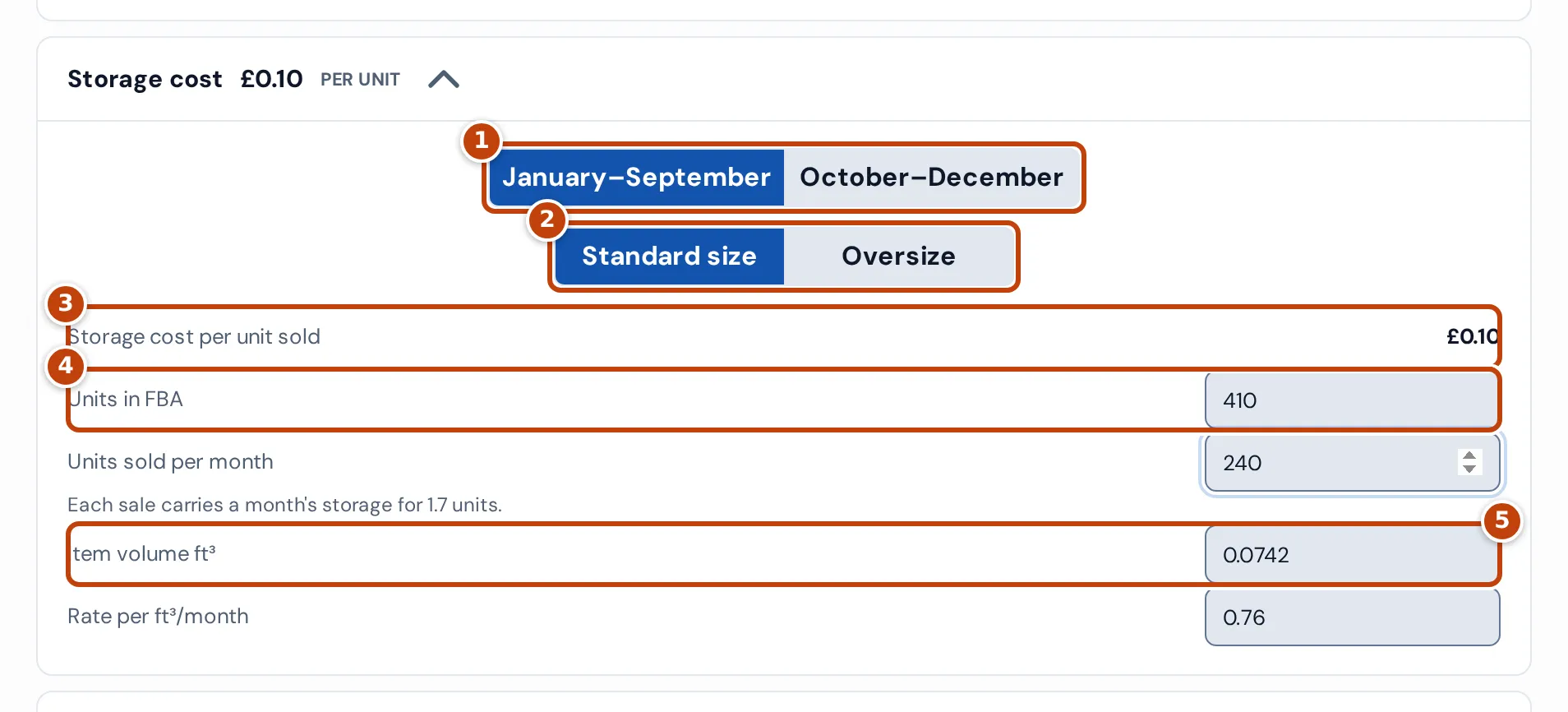
On the Amazon FBA tab, Storage cost estimates Amazon’s monthly storage fee as item volume × monthly rate:
- Item volume ft³ marker 5 starts at the volume Amazon reports for the product or, failing that, its package dimensions.
- The season marker 1 starts at today’s, and the size marker 2 at Standard size when the package is at most 45 × 34 × 26 cm and 12 kg (or has no dimensions), otherwise Oversize.
- Rate per ft³/month follows them. In the UK marketplace it’s £0.76 (January to September) or £1.37 (October to December) for standard size, and £0.50 or £0.79 for oversize. Elsewhere it starts at 0, so enter your own.
That gives Monthly storage cost per unit. Enter your stock at Amazon in Units in FBA marker 4 and it becomes Storage cost per unit sold marker 3: a month’s storage for all that stock, spread over the month’s sales (volume × rate × units in FBA ÷ Units sold per month, the same figure as Estimated monthly sales in the footer).
Other costs: VAT, tax code and cost of goods
Section titled “Other costs: VAT, tax code and cost of goods”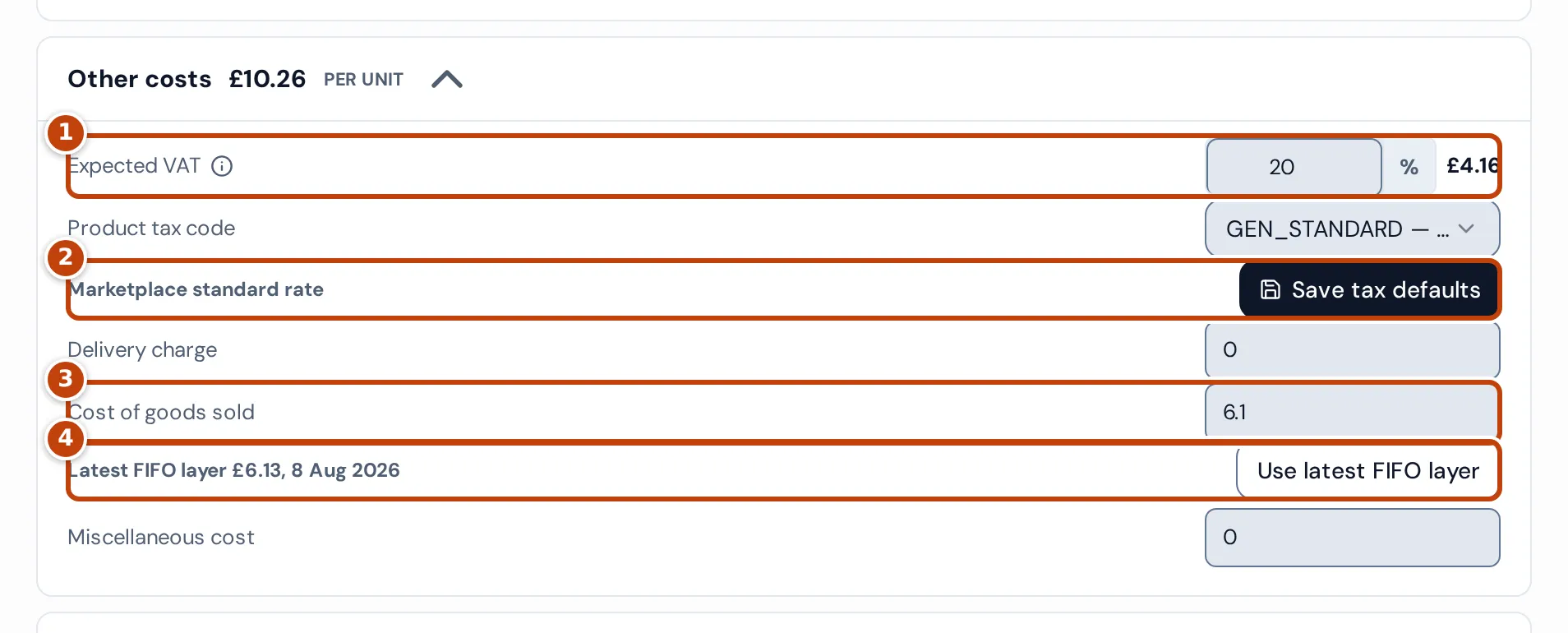
Other costs totals the VAT in the price, cost of goods and any Miscellaneous cost.
Expected VAT
Section titled “Expected VAT”Expected VAT marker 1 is the VAT rate included in your selling price. The amount beside it is the VAT in the selling price plus any Delivery charge: price − price ÷ (1 + rate). It counts as a cost because the VAT isn’t yours to keep. The rate starts at:
- the product’s VAT rate from Product settings, if it has one, when you’re VAT-registered in the marketplace’s country today;
- otherwise the country’s standard rate, when you’re registered there;
- 0% when you aren’t registered there, labelled Not VAT registered here, so no output VAT.
The label marker 2 says where the rate came from, for example Marketplace standard rate. VAT registrations are set on the VAT page.
Save tax defaults
Section titled “Save tax defaults”Save tax defaults marker 2 saves the Product tax code and Expected VAT rate as the product’s Product tax code and VAT rate on Product settings, where they’re also used for sales Amazon doesn’t report VAT on. It needs edit access to both Profit & costs and Products & listings. Without it, Save tax defaults is greyed out and a note below it says which access is needed. If you aren’t VAT-registered in the marketplace and haven’t changed Expected VAT, only the tax code is saved, so the 0% shown doesn’t replace the product’s rate.
Cost of goods sold
Section titled “Cost of goods sold”Cost of goods sold marker 3 starts at the product’s default cost or, without one, the unit cost of its latest FIFO layer: the most recent stock received from a purchase order, at Amazon or as opening stock, in the marketplace’s currency.
The note marker 4 shows that layer’s cost and date; select Use latest FIFO layer to use it. As your latest purchase price, it can differ from the current FIFO cost on Product settings, which is your oldest unsold stock’s cost. See Costs & COGS.
Refund scenario
Section titled “Refund scenario”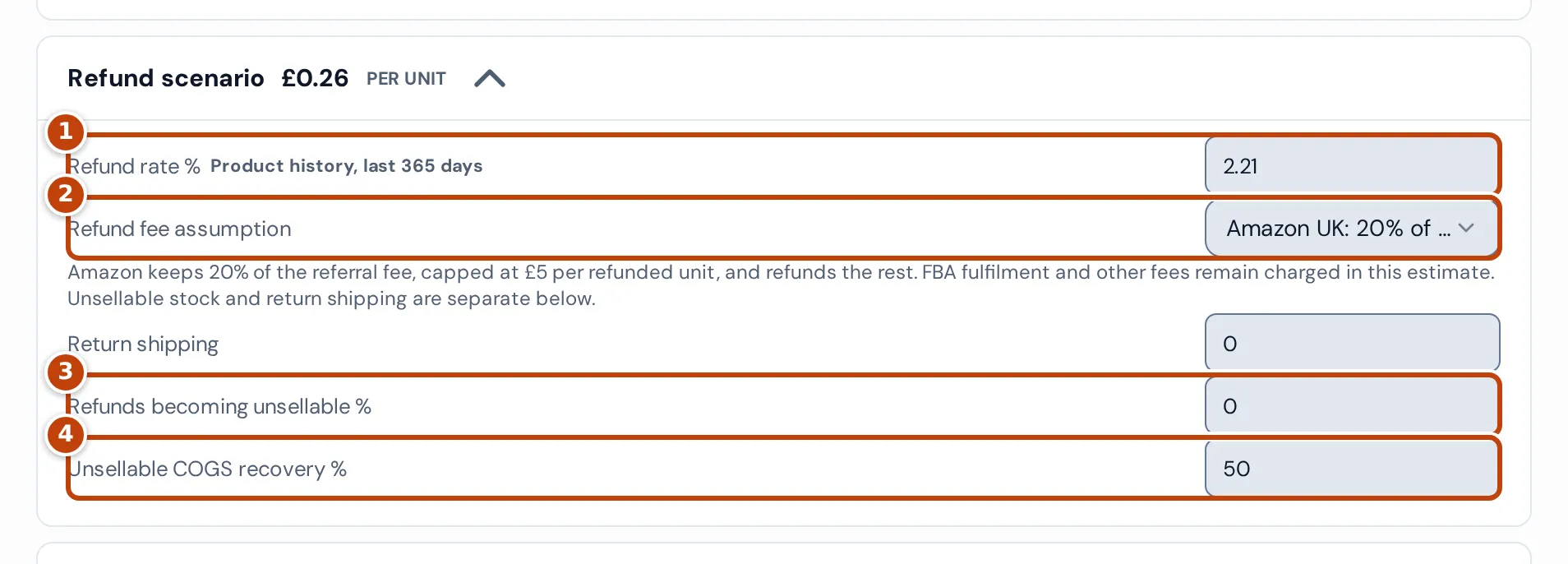
The Refund scenario panel is the average refund cost per unit sold: the loss on a refunded unit × the refund rate.
Refund rate % marker 1 starts at units refunded ÷ units sold in the last 365 days, labelled:
- Product history, last 365 days: this product in this marketplace, when it sold at least 20 units.
- Account history, last 365 days: your whole account, when the product sold fewer than 20 and the account at least 100.
- Default estimate: 2%, when there isn’t enough history.
The loss on a refunded unit is the price excluding VAT plus Return shipping, less the selling fees given back and the cost of goods recovered. Returned units go back into stock, except the share in Refunds becoming unsellable % marker 3, which recovers only Unsellable COGS recovery % marker 4 of its cost (starting at the product’s unsellable recovery setting).
On the Amazon FBA tab in the UK marketplace, Refund fee assumption marker 2 starts at Amazon UK: 20% of referral fee, capped at £5: Amazon keeps 20% of the referral fee, up to £5, and gives back the rest; other fees stay charged. Otherwise (or with Manual marketplace fee loss), Fee loss on refund % is the share of selling fees not given back, starting at 100%. Tabs other than Amazon FBA add Amount refunded %, starting at 100%.
In the screenshot: £3.75 referral fee − 20% = £3.00 given back, so 2.21% × (£24.99 ÷ 1.2 − £3.00 − £6.10 cost recovered) = £0.26.
FBA inbound
Section titled “FBA inbound”On the Amazon FBA tab, FBA inbound adds the cost of getting stock into Amazon per unit: Cost per pallet ÷ Units per pallet, plus Inbound placement fee per unit. The pallet cost counts only when Pallets into FBA/month and Units per pallet are both above 0. All start at 0.
Model another sales channel
Section titled “Model another sales channel”Select a channel tab in the Profit calculator to see the product’s profit sold another way. Figures you’ve entered stay when you switch.
| Tab | Selling fees | Fulfilment |
|---|---|---|
| Amazon FBA | Amazon fees | FBA fulfilment fee |
| MCF only | None | MCF fulfilment fee |
| eBay + MCF | eBay fee % (starts at 12.8% of price plus delivery charge) and eBay fixed fee (0.30) | MCF fulfilment fee |
| Shopify + MCF | Shopify payment % (1.7%), Shopify fixed fee (0.25) and Third-party transaction % (0%) | MCF fulfilment fee |
| Own fulfilment, Custom | Marketplace fee you enter | Fulfilment cost you enter |
The eBay and Shopify starting figures are general rates; check them against your plan. Outside Amazon FBA, you can add 3PL pick and pack, 3PL other cost and 3PL storage per unit, and FBA inbound and the digital services fee don’t apply.
Get an MCF fee from Amazon
Section titled “Get an MCF fee from Amazon”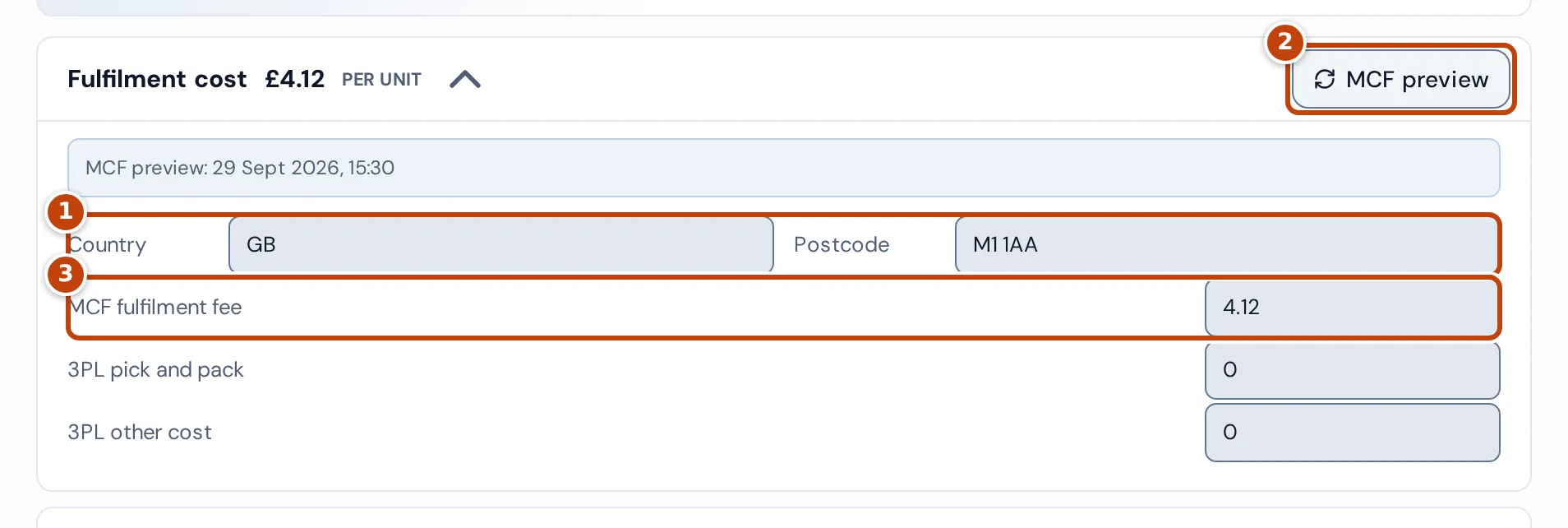
On the MCF only, eBay + MCF and Shopify + MCF tabs, the Profit calculator can ask Amazon what a Multi-Channel Fulfilment order would cost:
- Open Fulfilment cost.
- Check Country marker 1, which starts at the marketplace’s country, and enter a delivery Postcode.
- Select MCF preview marker 2. Amazon’s total fee for a Standard-speed delivery of one unit fills MCF fulfilment fee marker 3.
MCF preview needs a postcode, a product with a SKU, and edit access to the business. You can also type the fee yourself.
How the footer figures are worked out
Section titled “How the footer figures are worked out”The Profit calculator’s footer shows the result per unit:
- Total cost / unit: all the panels added together, VAT and refunds included.
- Estimated monthly sales: units you expect to sell a month, starting at 1; the same figure as Units sold per month.
- Net profit / unit: selling price plus delivery charge, minus Total cost / unit.
- Estimated monthly profit: Net profit / unit × Estimated monthly sales.
- Net margin: Net profit / unit as a percentage of selling price plus delivery charge, including VAT.
In the screenshot at the top of this article: £6.10 cost of goods + £3.89 Amazon fees + £3.07 FBA fulfilment + £0.06 storage + £4.16 VAT + £0.26 refunds = £17.54. £24.99 − £17.54 = £7.45 net profit per unit; × 240 = £1,788.00 a month; £7.45 ÷ £24.99 = 29.81% net margin.
Save and reuse scenarios
Section titled “Save and reuse scenarios”A scenario is a named copy of every figure in the Profit calculator.
- Enter a Name under Scenarios, for example “Q4 FBA price”.
- Select Save. The scenario appears in the list.
- To bring it back, select it. If it’s for another marketplace, the calculator switches marketplace first.
While a scenario is selected, Save updates it and Delete selected removes it.
Why a figure shows 0 or an error
Section titled “Why a figure shows 0 or an error”“Profit access must be confirmed before opening this calculator.”
Section titled ““Profit access must be confirmed before opening this calculator.””Your role in the business doesn’t include profit figures, so the Profit calculator stays closed. Ask the business owner to change your access on the Team page.
Referral fee or FBA fulfilment fee is 0
Section titled “Referral fee or FBA fulfilment fee is 0”Crateworth has no Amazon fee estimate for the listing yet, or the estimate didn’t include that fee. Enter the fee yourself, or check again later.
Selling price or Cost of goods sold is 0
Section titled “Selling price or Cost of goods sold is 0”Selling price is 0 when the listing has no current price. Cost of goods sold is 0 when the product has no default cost or cost layer; add one on Costs & COGS. A note Latest FIFO layer is still being valued or Latest FIFO layer is missing an FX rate means its latest layer has no cost yet.
Storage cost is 0
Section titled “Storage cost is 0”Outside the UK marketplace, enter your own Rate per ft³/month. If the product has no volume or package dimensions, enter Item volume ft³.
Expected VAT is 0%
Section titled “Expected VAT is 0%”You aren’t VAT-registered in the marketplace’s country today, so no VAT is deducted from the sale. If that’s wrong, check your registrations on the VAT page.
“Product not found”
Section titled ““Product not found””The product has no listing in the marketplace you chose. Choose one it sells in.
The MCF preview fails
Section titled “The MCF preview fails”Amazon did not return an MCF fulfilment preview. means Amazon gave no fee for that address. Check the country and postcode, or enter the fee yourself.
Related pages
Section titled “Related pages”- Inventory overview: the product details page the calculator opens from.
- Product settings: VAT rate, tax code and unsellable recovery.
- Costs & COGS: the costs behind cost of goods sold.
- VAT: your VAT registrations.