
Costs & COGS
Costs & COGS shows what each product’s stock cost, how its sales are valued, and which products are missing a cost. Cost of goods (COGS) feeds profit on the Dashboard and the P&L. To open the page, in the sidebar, under Inventory, select Costs & COGS.
How Crateworth works out cost of goods
Section titled “How Crateworth works out cost of goods”Crateworth values sales first in, first out (FIFO): each unit sold takes the cost of the oldest stock that’s still unsold.
- Cost layers: each time stock arrives, Crateworth records a cost layer with its date, units and cost per unit. Layers come from purchase order receipts (PO receipt), stock received into Amazon (FBA receipt), customer returns put back into sellable stock (FBA return), stock found again after it was recorded as lost (Warehouse recovery, at the cost the loss was written off at) and historical costs you enter (Initial COGS).
- Cost per unit: the unit cost plus the landing cost per unit, such as freight and duty.
- One queue per product: layers are kept per ASIN and shared by all your marketplaces. A virtual multipack uses its base product’s layers: one pack sold uses the pack quantity of base units.
- Order: shipped units are matched to layers in the order the customer orders were placed. A unit can only take a layer dated on or before its order date. Stock Amazon disposes of also uses up layers.
- No layer left: the unit uses a fallback cost, which is the cost entry in effect on the order date or, failing that, the product’s default cost. If there’s no fallback cost either, the unit has no cost until you add one: see Fix a product with missing cost.
- Other currencies: each cost is converted at the exchange rate for its own date. A layer uses the layer’s date. When a purchase order’s supplier payments are matched to your bank transactions, those payments use their booking dates. A fallback cost uses the order date.
- Returns: a customer return that goes back into sellable stock gets its original cost back as an FBA return layer, dated when the return was confirmed, so the unit is costed again when it sells.
- Recalculation: when you add or change a cost, Crateworth recalculates that product in the background. The product shows Updating costs… until it finishes.
Worked example
Section titled “Worked example”You receive 1,200 units on PO-1037 at £6.03 each (£5.55 unit cost plus £0.48 landing), then 480 units on PO-1040 at £6.13. Every sale costs £6.03 until PO-1037’s 1,200 units have sold; after that, sales cost £6.13. A sale placed before PO-1037’s receipt date can’t use either layer, so it uses the fallback cost.
What’s on the Costs & COGS page
Section titled “What’s on the Costs & COGS page”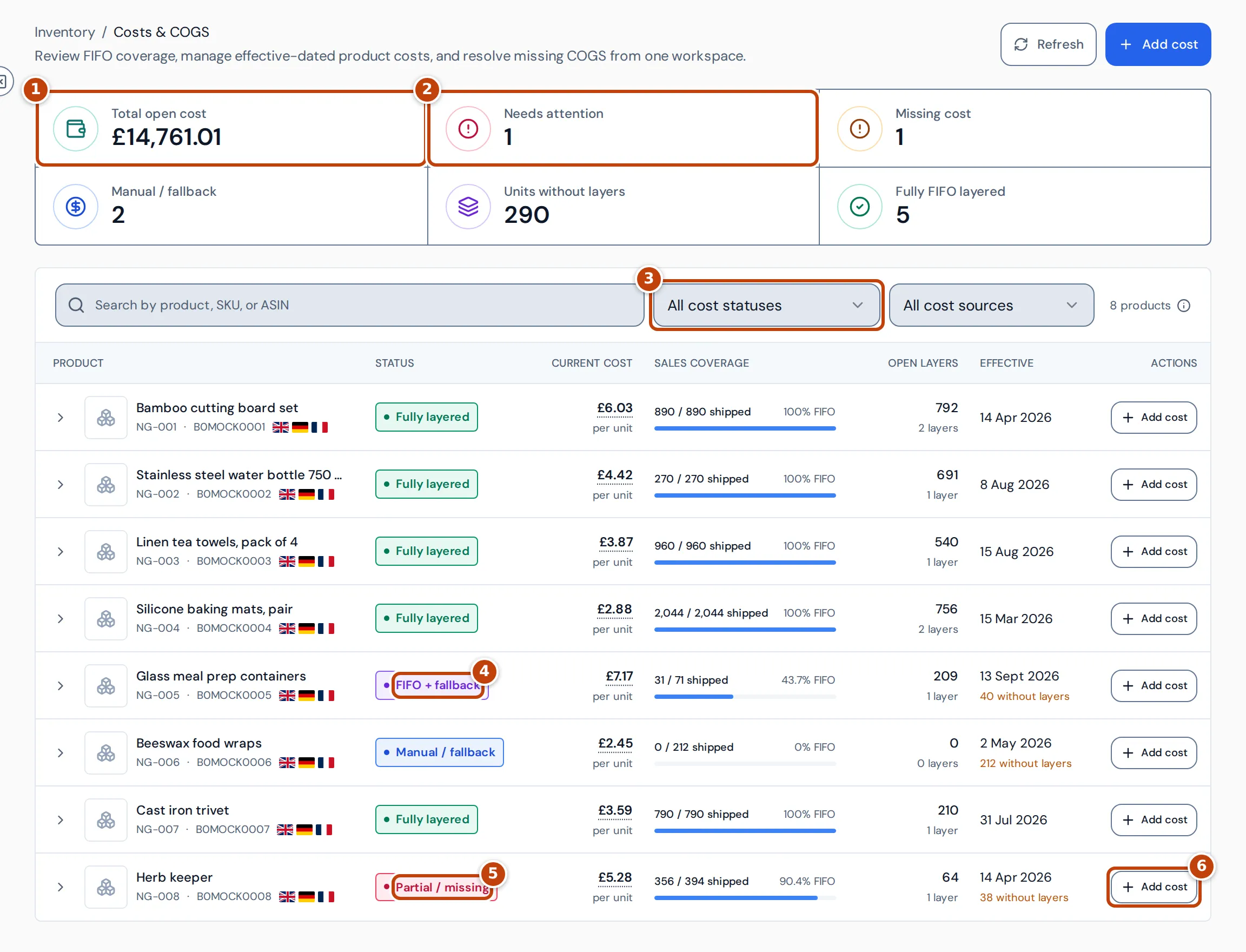
The summary figures along the top are:
- marker 1 Total open cost: the remaining value of every open cost layer, including landed costs and returned stock, in your reference currency. It doesn’t change with the table filters.
- marker 2 Needs attention: products missing a usable cost, or whose cost update is delayed.
- Missing cost: products without a complete cost basis.
- Manual / fallback: products using a fallback cost for some or all sales.
- Units without layers: sold units valued outside cost layers.
- Fully FIFO layered: products whose shipped units are all covered by cost layers.
Select any figure except Total open cost to filter the table. You can also search, and filter by status marker 3 or cost source.
The columns in the table
Section titled “The columns in the table”| Column | What it shows |
|---|---|
| Status | How the product’s sales are costed (see below). |
| Current cost | The cost per unit the next sale will use: the oldest open layer, or the fallback cost. Select it to see where it comes from. |
| Sales coverage | Shipped units covered by cost layers, out of all shipped units. |
| Open layers | Units left in open layers, including returned stock, and the number of layers. |
| Effective | The date of the current cost, and how many sold units have no layer. |
Statuses
Section titled “Statuses”- Fully layered: every shipped unit is covered by a cost layer.
- FIFO + fallback marker 4: layers are used first; the remaining units use a fallback cost.
- Manual / fallback: sales are valued with a cost entry or default cost.
- Partial / missing marker 5 or Missing cost: some sold units have no layer and no fallback cost.
- Updating costs…: costs are being recalculated. Cost update delayed means it’s taking longer than expected.
- Allocation needed: some shipped units need their cost layers matching again.
- Shipment data incomplete: Amazon hasn’t yet sent complete shipment records for some ordered units.
- Ready: a cost is set, but nothing has sold yet. No cost yet: add a cost before sales begin.
See a product’s cost layers
Section titled “See a product’s cost layers”Select the arrow at the start of a row to show the product’s Cost layers, oldest first.
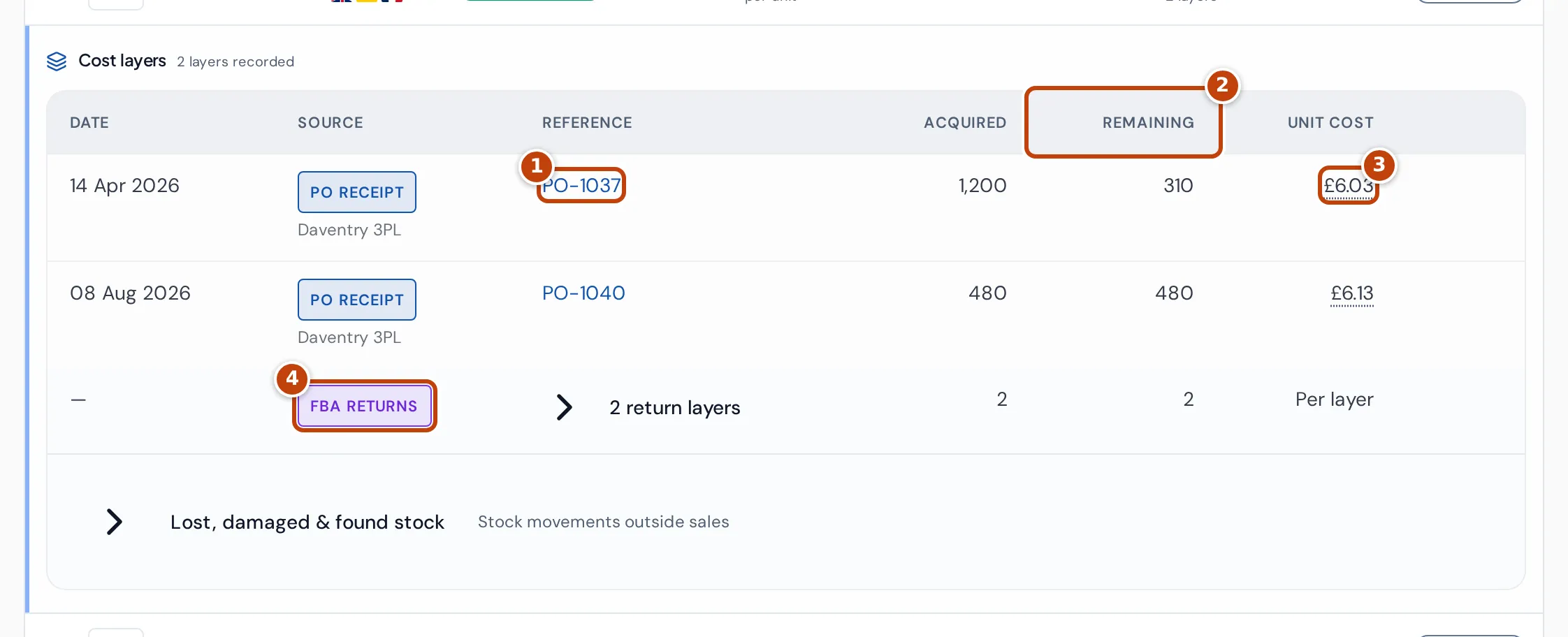
Each layer shows its date, source and reference marker 1, units Acquired and Remaining marker 2, and Unit cost marker 3. Select a unit cost to see its parts, such as supplier payments and freight, each with its original amount, currency and date, and whether it’s actual or estimated. Returned stock is grouped under FBA returns marker 4.
Select the product row itself to open its cost details: Overview (sales coverage, with Add manual cost and Backfill units), Cost layers, and History (the product’s cost entries).
Add a current or fallback cost
Section titled “Add a current or fallback cost”A cost entry is the fallback cost per unit from a date onwards, used when a sale has no cost layer left. Units covered by a layer keep the layer’s cost.
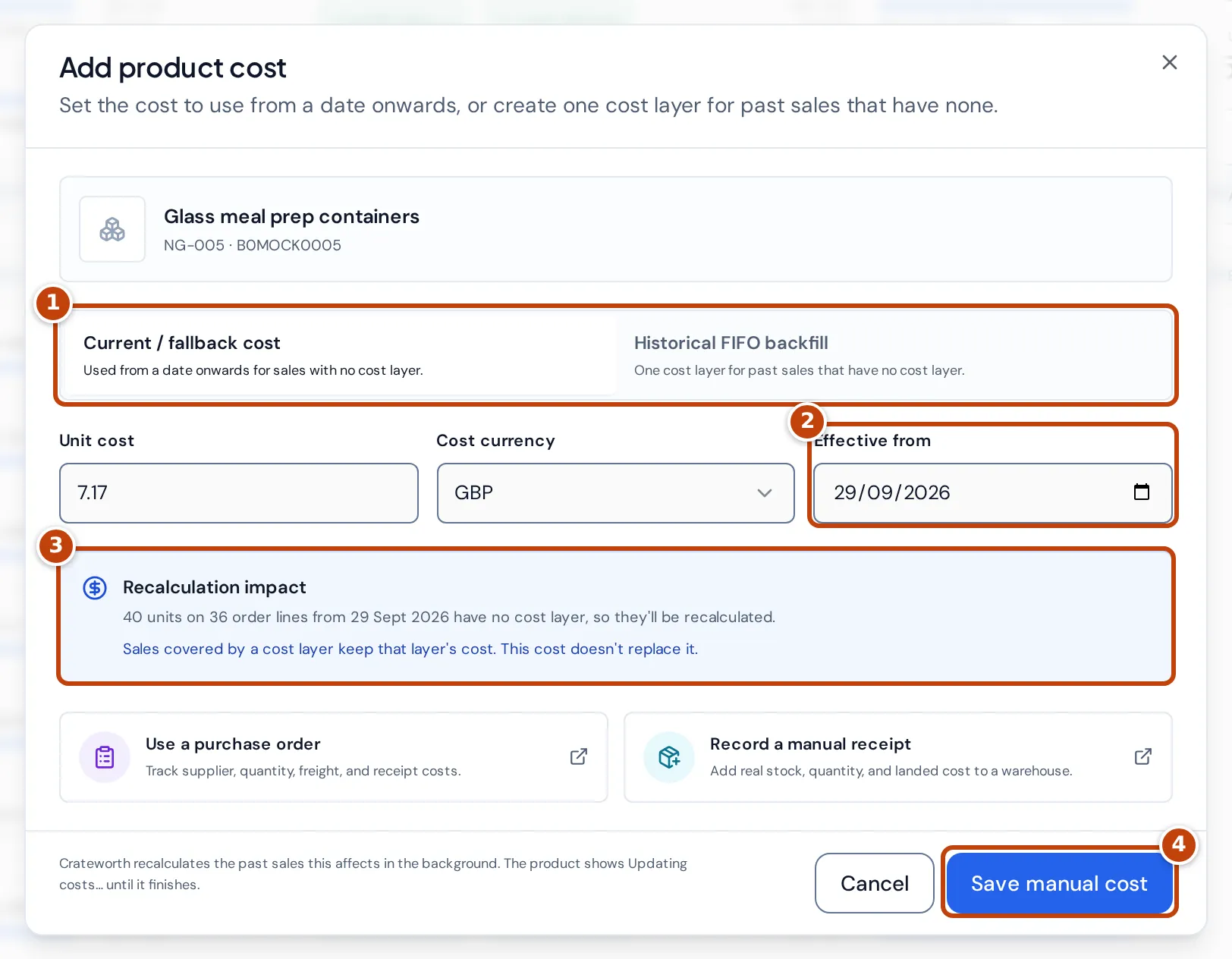
- Select Add cost on the product’s row, or at the top of the page and then choose the product.
- Keep Current / fallback cost selected marker 1.
- Enter the Unit cost and choose the Cost currency.
- Choose the date in Effective from marker 2.
- Check Recalculation impact marker 3: how many sold units from that date have no cost layer and will be recalculated. A later cost entry still applies to the sales after its own date.
- Select Save manual cost marker 4.
The cost applies from its date until the next cost entry. A cost entered for a date that already has one replaces it.
Cost sales made before your first recorded stock
Section titled “Cost sales made before your first recorded stock”Sales made before the first stock Crateworth knows about have no layer. You can create one historical layer sized to cover them:
- Select Add cost on the product’s row and choose Historical FIFO backfill.
- Enter the Unit cost, Landing cost / unit and Cost currency.
- Choose the First eligible sale date.
- Check Historical layer impact: the sold units the layer covers and its total value.
- Select Create backfill layer.
A backfill layer covers past sales only and doesn’t add warehouse stock. To record real stock, use a purchase order or Add stock on Warehouse stock.
Fix a product with missing cost
Section titled “Fix a product with missing cost”- Select Needs attention or Missing cost to list the products.
- Check the Effective column for how many units have no layer.
- If the stock came from a purchase order, make sure the order is recorded and received. The receipt creates the cost layer.
- Otherwise, add a fallback cost dated on or before the first uncosted sale, or create a historical backfill layer.
- Wait for Updating costs… to clear. Profit that depends on these sales then updates.
Why a cost looks wrong
Section titled “Why a cost looks wrong”Current cost shows “FX unavailable”
Section titled “Current cost shows “FX unavailable””Costs & COGS has no exchange rate yet to convert the cost’s currency into your reference currency.
The current cost is different from my latest purchase price
Section titled “The current cost is different from my latest purchase price”On Costs & COGS, the current cost is the oldest stock still unsold, not the newest. It changes to the newer price once the older layers have sold.
Profit is blank because a sale has no cost
Section titled “Profit is blank because a sale has no cost”Profit stays blank while a unit sold in the period has no cost. Other missing figures, such as Amazon fees, can also leave it blank. On Costs & COGS, select Needs attention to find products without a cost and add one.
A product shows units without layers even though I’ve added a purchase order
Section titled “A product shows units without layers even though I’ve added a purchase order”A sale can only use a cost layer dated on or before its order date. Sales placed before the purchase order’s receipt date need a fallback cost or a backfill layer.
Related pages
Section titled “Related pages”- Warehouse stock: lots and landed cost in your own warehouses.
- Purchase orders: where most cost layers come from.
- Product settings: the cost each product’s profit estimate uses.
- Dashboard: where cost of goods feeds profit.