
Profit and loss
The P&L page is a monthly profit and loss statement for your Amazon business: one column per month, from sales at the top to net profit, then ratios such as margin, ROI and TACoS. Use it to see how each month’s revenue turned into profit, and to compare months side by side. In the sidebar, under Finance, select P&L.
What’s on the P&L page
Section titled “What’s on the P&L page”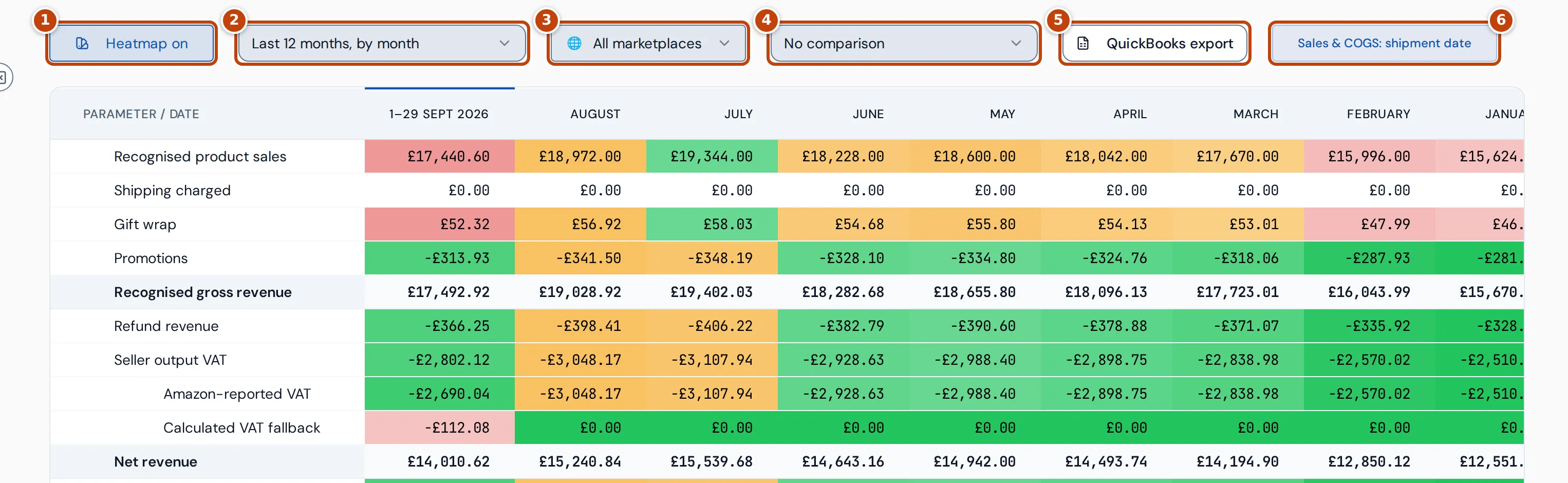
The controls along the top:
- marker 1 Heatmap on colours each row from its worst month to its best month. The heatmap is on when the page opens; select the button to turn the colours off, and it then reads Heatmap off.
- marker 2 The period list chooses how many months the table shows: Last 12 months, by month (the default), Last 6 months, by month, Last 3 months, by month or Year to date, by month.
- marker 3 All marketplaces chooses one marketplace, or all of them.
- marker 4 The comparison list adds a comparison with an earlier period.
- marker 5 QuickBooks export opens the QuickBooks journal export, which creates a CSV of your Amazon activity to import into QuickBooks.
- marker 6 Sales & COGS: shipment date is a reminder that the P&L counts sales on the day they shipped.
The current month is the first column, labelled with the days it covers so far, for example “1–29 Sept 2026”. Earlier months follow, newest first, then a Total column for all the months shown.
Every amount is in your reference currency, which you set in Settings. Sales in other currencies are converted into it.
How the P&L lines are built
Section titled “How the P&L lines are built”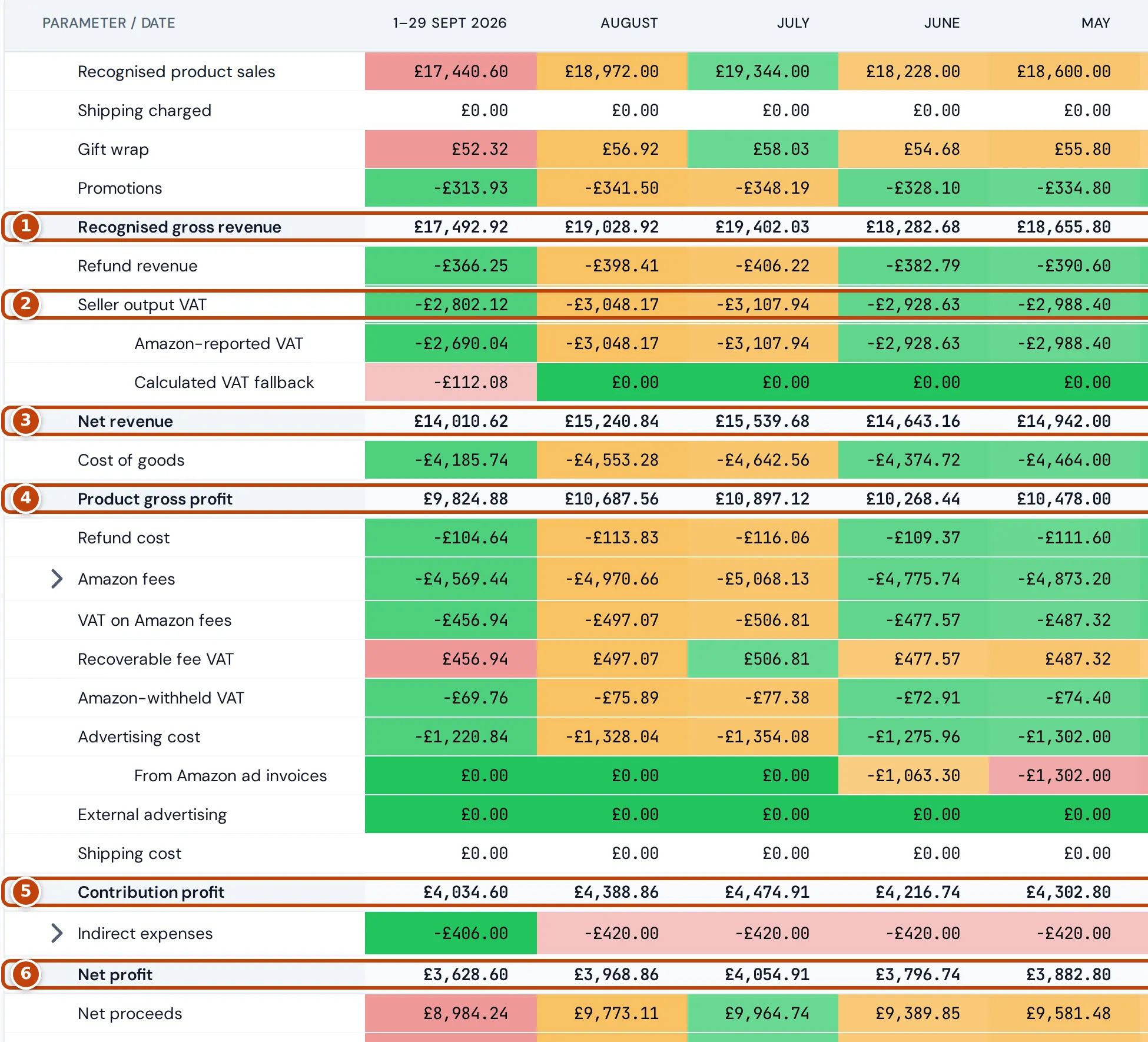
The table reads from top to bottom. Shaded rows are subtotals. Costs and deductions show as negative amounts. Some lines are shown for information only and aren’t taken off profit; they’re marked below.
Revenue:
- Recognised product sales: the price of the items that shipped in the month, including any VAT, before promotions.
- Shipping charged, Gift wrap and Promotions: shipping and gift wrap charged to customers, and promotional discounts.
- marker 1 Recognised gross revenue: product sales, shipping charged and gift wrap, including VAT, before promotions and refunds.
- Refund revenue: refunds Amazon posted in the month, including the VAT refunded.
- marker 2 Seller output VAT: the VAT in your sales that you account for, less the VAT reversed by refunds posted in the month. It splits into Amazon-reported VAT, the VAT Amazon reported, and Calculated VAT fallback, VAT worked out from the product’s VAT rate when Amazon hasn’t reported it.
- marker 3 Net revenue: recognised gross revenue less promotions, refund revenue and seller output VAT.
Costs and profit:
- Cost of goods: the cost of the units sold, less the cost of units that come back into stock with a refund posted in the month.
- marker 4 Product gross profit: net revenue less cost of goods. It leaves out Amazon fees, advertising, shipping and your other expenses.
- Refund cost: for information only. It shows what refunds posted in the month cost you, across the refunded money, fees, returned or lost stock and VAT. It isn’t taken off profit: the refunded money is already in Refund revenue, and returned stock in Cost of goods.
- Amazon fees: Amazon’s fees, without VAT.
- VAT on Amazon fees: the VAT Amazon charged on its fees. It’s taken off profit, and Recoverable fee VAT adds back the part you can reclaim.
- Amazon-withheld VAT: for information only. It’s VAT that Amazon collected and paid itself as a marketplace facilitator, and it isn’t taken off profit.
- Advertising cost: what you spent on Amazon ads, without VAT. It comes from the Amazon Ads reports. Amazon keeps those reports for about 95 days, so for days they don’t cover, such as before you connected Amazon Ads, it comes from the advertising invoices in your Amazon payments instead. When any month shown has some, From Amazon ad invoices beneath it shows that part. Invoices aren’t split by product, so per-product figures elsewhere, such as Ad spend on Trends, show only report spend.
- External advertising and Shipping cost: advertising recorded in your expenses, and the cost of shipping orders you fulfil yourself.
- marker 5 Contribution profit: product gross profit less Amazon fees and the VAT on them, advertising and shipping, plus recoverable fee VAT. It also includes Amazon reimbursements and stock write-offs, which don’t have rows of their own, so the rows above don’t always add up to it exactly.
- Indirect expenses: business costs not tied to a product, from your expenses.
- marker 6 Net profit: contribution profit less indirect expenses.
- Net proceeds: net revenue less Amazon fees and the VAT on them. It isn’t a payout forecast: it doesn’t follow Amazon’s settlement dates, reserves or transfers.
Below the profit lines, the counts and ratios:
| Line | What it is |
|---|---|
| Units, Refunds | Units sold, and refunded units posted |
| TACoS | All advertising (Amazon and external) divided by recognised gross revenue |
| PPC ACOS | Amazon Ads report spend divided by the sales Amazon attributes to your ads. Advertising cost from Amazon ad invoices isn’t included, because no sales are attributed to it |
| Refunded unit rate, Refunded order rate | Refunded units divided by units sold, and orders with a refund divided by orders |
| Sellable return rate | Returned units Amazon graded sellable, divided by returned units with a grade |
| Net sales margin | Net profit divided by net revenue |
| ROI | Net profit divided by cost of goods |
| Active subscriptions (SnS) | Subscribe & Save subscriptions. The Total column shows the latest complete month |
| Sessions, Unit session percentage | Visits to your product pages, from Amazon’s sales and traffic data, and units divided by sessions. Amazon counts sessions per ASIN, so an ASIN sold under several SKUs counts once, the same as on the Dashboard |
See which fees and expenses make up a month
Section titled “See which fees and expenses make up a month”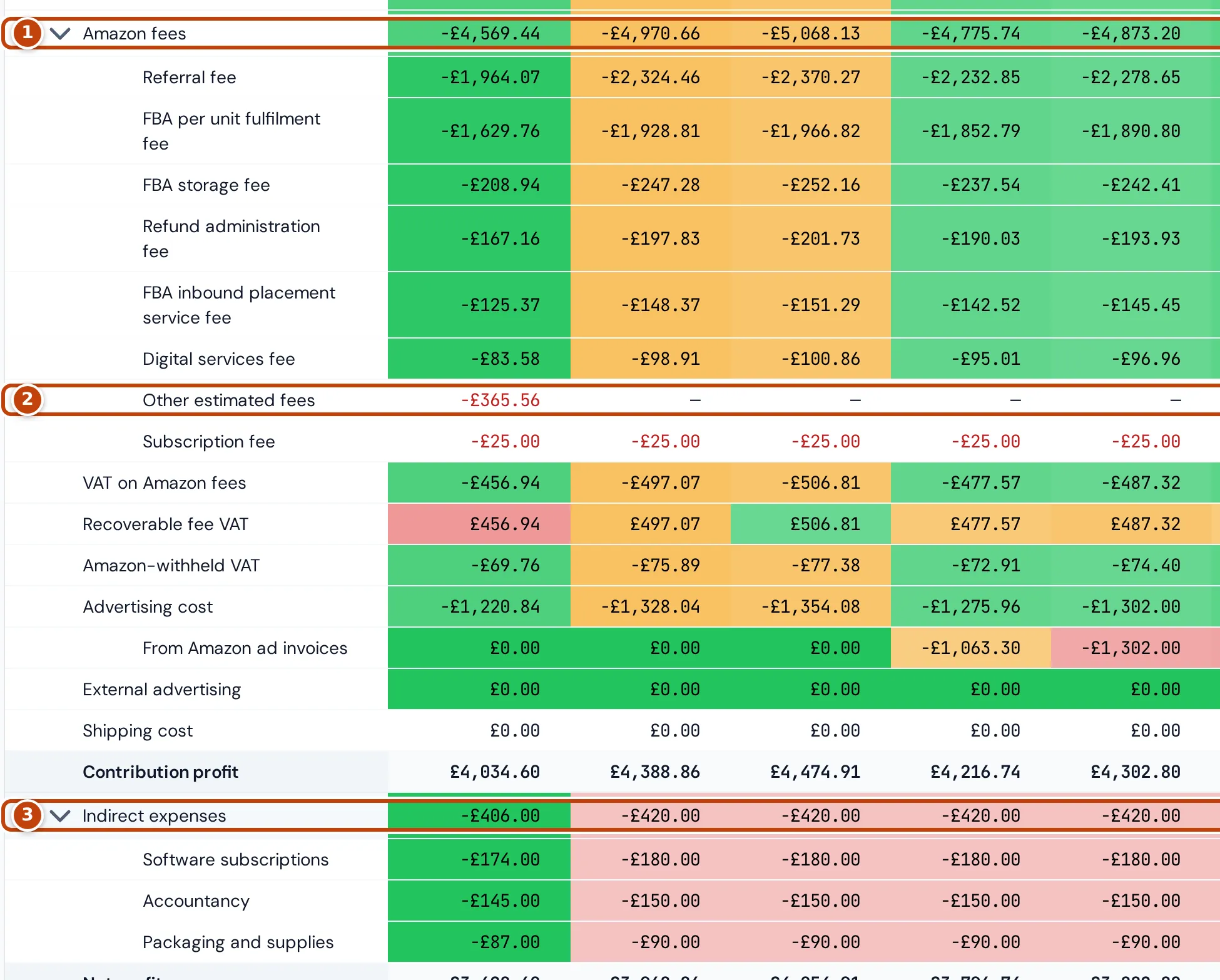
Two rows on the P&L page expand. Select the row name to open or close it.
- marker 1 Amazon fees lists each fee type Amazon charged, for each month, such as referral and FBA fulfilment fees. Inbound transportation charges are grouped under one heading.
- marker 2 Fees that are still estimates are listed separately: their names end in “(estimated)”, or read Other estimated fees. An order’s estimate is replaced by the fee Amazon actually charges once Amazon posts it, so estimates usually appear only in the latest weeks.
- marker 3 Indirect expenses lists your expenses by category.
If no detail is available for the months shown, the row says so instead.
Compare with an earlier period
Section titled “Compare with an earlier period”To compare the months shown with an earlier period, choose an option in the comparison list: Previous period, Previous week, Previous month, Same dates last year or Custom comparison period. For Same dates last year you can tick Align weekdays (364 days earlier).
Two columns appear after Total:
- Comparison: the comparison period’s total for each line.
- Change: the percentage change from the comparison total to this total. Green means the change is good for that line and red means it’s bad, so a fall in a cost shows green.
Fee and expense detail rows show — in these columns.
Which dates the P&L uses
Section titled “Which dates the P&L uses”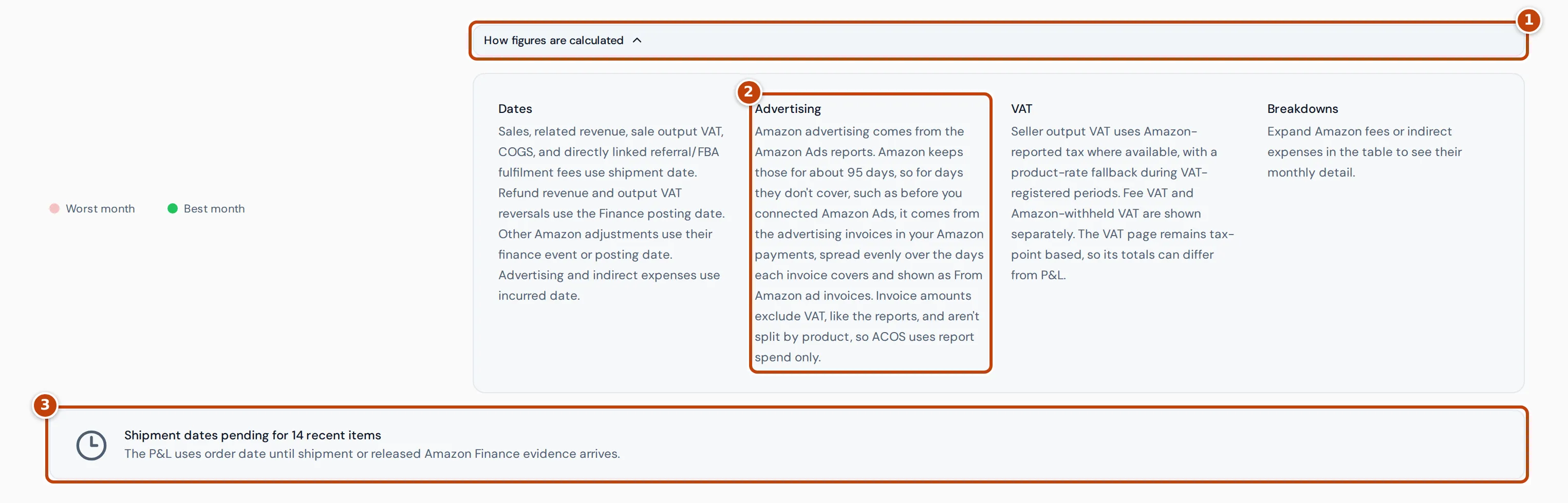
The P&L counts each kind of figure on its own date. Select How figures are calculated marker 1 below the table to see the same rules on the page:
- Sales, shipping and gift wrap, the output VAT on sales, cost of goods, and the referral and FBA fulfilment fees for those sales count on the day the order shipped.
- Refunds, and the VAT reversed by refunds, count on the day Amazon posted them in its financial data.
- Other Amazon fees and adjustments count on their own Amazon posting date.
- Advertising and indirect expenses count on the day they were incurred.
- Advertising from an Amazon ad invoice is spread evenly over the days the invoice covers: from the day of the previous invoice to the day before this one, at most 31 days. Only the days the Amazon Ads reports don’t cover use it, so no day counts both. A refund of advertising charges counts on the day Amazon posted it. The Advertising note marker 2 under How figures are calculated summarises this.
So a refund lowers revenue in the month Amazon posts it, not the month of the original sale. The Dashboard counts sales on the day they were ordered instead, so the two pages’ totals for a month can differ. See Why figures differ from Seller Central.
When the shipment date isn’t known yet
Section titled “When the shipment date isn’t known yet”Until Crateworth has an order’s shipment date from Amazon, the P&L dates the sale by the date in Amazon’s financial data or, if that hasn’t arrived either, by its order date. Notes under the table marker 3 say when this applies:
- Shipment dates pending for recent items: these orders use their order date until the shipment date, or Amazon’s financial data for them, arrives. This is normal for the last few days.
- Shipment evidence still missing for older items: these items are outside the last seven days and still use their order date, so their revenue and cost of goods may sit in a different month.
- Amazon Finance date used: Amazon’s shipment record for these items wasn’t available, so the P&L uses the date from Amazon’s financial data instead.
How VAT shows on the P&L
Section titled “How VAT shows on the P&L”The P&L shows Seller output VAT only for days on which you’re registered for VAT in the marketplace’s country. It uses the VAT Amazon reported where there is one. When Amazon hasn’t reported VAT on a sale, the P&L works the VAT out from the VAT rate in the product’s settings (or the country’s standard rate if the product has none), shows it as Calculated VAT fallback, and takes it off net revenue.
VAT on Amazon fees and VAT that Amazon withheld as a marketplace facilitator have their own lines. Your VAT registrations, set on the VAT page, decide which dates count as registered and whether fee VAT is recoverable. Fee VAT is recoverable on every registered day unless the registration uses the Flat Rate Scheme; on the Flat Rate Scheme it stays a cost.
The VAT page dates VAT by its tax point rather than by these P&L dates, so its totals for a month can differ from the P&L’s.
Why a figure is blank, or a note appears
Section titled “Why a figure is blank, or a note appears”Blank figures
Section titled “Blank figures”A cell shows — when Crateworth can’t state the figure safely, rather than guess:
- Cost of goods is blank for a month in which an item sold without a cost. Add the product’s cost on the Costs & COGS page (see Costs & COGS). The profit lines and ratios that depend on it, and Refund cost, are blank too.
- Profit lines are also blank while a fee, VAT amount, exchange rate or shipping cost for an order you fulfil yourself is missing.
- A ratio is blank when there’s nothing to divide by, for example ROI in a month with no cost of goods.
“of gross sales needs a VAT rate in Product settings”
Section titled ““of gross sales needs a VAT rate in Product settings””This note means some sales on VAT-registered days have no VAT reported by Amazon and no VAT rate Crateworth can use to work it out. Until they have one, the profit lines, Net proceeds and the ratios that depend on them are blank for those months. Add a VAT rate to the product in its product settings (see Product settings).
Recognition update pending
Section titled “Recognition update pending”Recognition update pending at the top of the page means the P&L is showing its last complete figures while Crateworth brings them up to date. If the P&L can’t load yet, for example just after your first import, the page shows a message with Retry.
No P&L data
Section titled “No P&L data”If the chosen months have no sales, the table says so. For a shorter period, select Switch to last 12 months to look further back.
Related pages
Section titled “Related pages”- Dashboard: today and recent periods, counted by order date.
- VAT: your VAT registrations and provisional VAT position.
- Why figures differ from Seller Central