
Subscribe & Save
The Subscribe & Save page shows how many shoppers subscribe to your products through Amazon’s Subscribe & Save programme, in each of your marketplaces, and when Crateworth last checked. To open it, in the sidebar, under Amazon reports, select Subscribe & Save.
What’s on the Subscribe & Save page
Section titled “What’s on the Subscribe & Save page”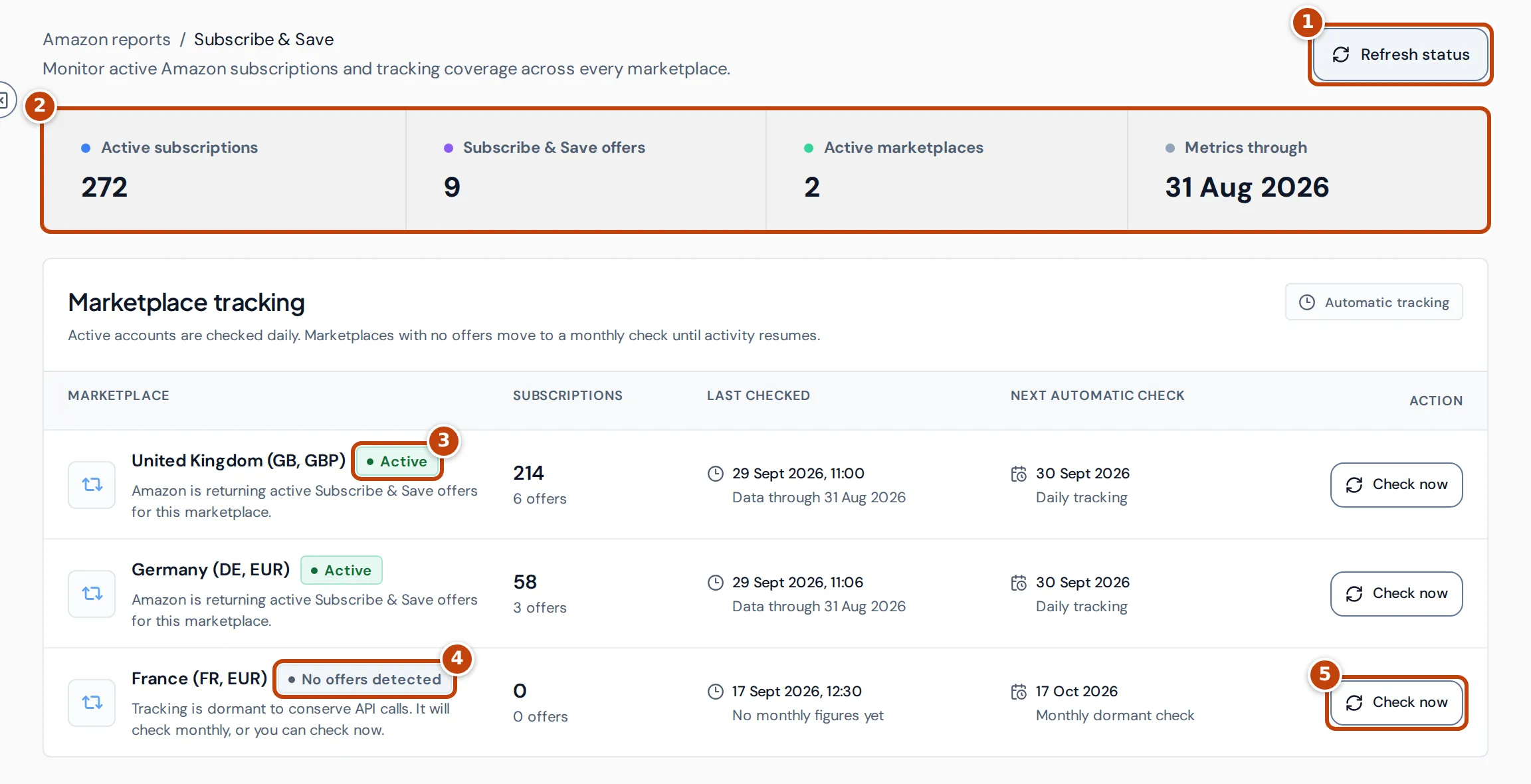
- marker 1 Refresh status reloads the page with the latest results. It doesn’t ask Amazon for new data.
- marker 2 The summary across all your marketplaces:
- Active subscriptions: the number of active subscriptions on your Subscribe & Save offers, as Amazon reported them at each marketplace’s last check.
- Subscribe & Save offers: how many of your offers are in Subscribe & Save, at the last check.
- Active marketplaces: how many marketplaces have the Active status.
- Metrics through: the latest month-end, across your marketplaces, for which Crateworth holds Amazon’s monthly Subscribe & Save figures.
- marker 3 and marker 4 Each marketplace’s status. See What each status means.
- marker 5 Check now asks Amazon for that marketplace’s Subscribe & Save data straight away.
The Marketplace tracking table has one row for each marketplace Crateworth syncs for you:
- Subscriptions: active subscriptions in that marketplace, with the number of offers underneath.
- Last checked: when Crateworth last asked Amazon, and Data through, the last day of Amazon’s monthly figures it holds.
- Next automatic check: when Crateworth will check again by itself. A marketplace with No offers detected shows Monthly dormant check underneath; the others show Daily tracking.
What each status means
Section titled “What each status means”| Status | What it means |
|---|---|
| Active | Amazon is returning Subscribe & Save offers for you in this marketplace. Crateworth checks it daily. A marketplace stays Active through two checks in a row with no offers, so it can briefly show Active with 0 offers. |
| No offers detected | Amazon returned no Subscribe & Save offers. Crateworth checks monthly to save requests to Amazon. |
| Amazon permission required | Amazon refused access to its Replenishment data, which holds Subscribe & Save. The page suggests reconnecting Amazon, then selecting Check now. Crateworth tries again by itself monthly. |
| Not supported | Amazon doesn’t provide Subscribe & Save data for you in this marketplace. Crateworth tries again by itself monthly. |
| Not checked yet | Crateworth hasn’t had a result from Amazon for this marketplace yet. Crateworth checks new marketplaces automatically; select Check now to check straight away. |
How often Crateworth checks
Section titled “How often Crateworth checks”Crateworth checks each marketplace automatically:
- An Active marketplace is checked about once a day.
- When an Active marketplace returns no offers three checks in a row, it moves to a monthly check. A marketplace with any other status that returns no offers moves to monthly straight away.
- Marketplaces showing Amazon permission required or Not supported are also checked monthly.
- As soon as a check finds offers again, the marketplace goes back to daily checks.
Amazon reports Subscribe & Save figures by calendar month, so Metrics through and Data through show the end of the most recent month Amazon has returned figures for, normally last month. The first check for a marketplace fetches up to two years of monthly figures.
Check a marketplace now
Section titled “Check a marketplace now”- On the Subscribe & Save page, find the marketplace in Marketplace tracking.
- Select Check now in its row. The button shows Checking… while Crateworth asks Amazon.
- When it finishes, the page says the marketplace was checked successfully and the row shows the new status and counts. If Amazon refused access or doesn’t support the marketplace, the check still finishes, and the row shows Amazon permission required or Not supported.
If Amazon can’t complete the check, the page says Amazon could not complete the Subscribe & Save check. Try again later. Select Refresh status to see the row’s latest state.
Only team members who can edit inventory can use Check now; view-only members see the results but can’t start a check.
Why a marketplace shows no subscriptions
Section titled “Why a marketplace shows no subscriptions”- No offers detected: Amazon returned no Subscribe & Save offers in that marketplace at the last check. If you’ve just enrolled products, select Check now rather than wait for the monthly check.
- Amazon permission required: reconnect Amazon so Crateworth can read Replenishment data, then select Check now.
- Last checked shows No monthly figures yet: Crateworth doesn’t hold any monthly figures for that marketplace yet. If no marketplace has figures, Metrics through shows No figures yet.
If the page shows No Amazon marketplaces to check, connect an Amazon account first. See Connect Amazon and import your data.
Related pages
Section titled “Related pages”- Customer value shows how often buyers come back to buy again.