
Billing
The Billing page shows your Crateworth trial or plan, how many Amazon orders you’ve used it for, and the allowances included with it. Billing covers every business in your account. To open it, open the account menu (your name at the bottom of the sidebar) and select Billing.
Only the account owner or an admin can choose or change a plan. Other people see the page but can’t change anything.
Your free trial
Section titled “Your free trial”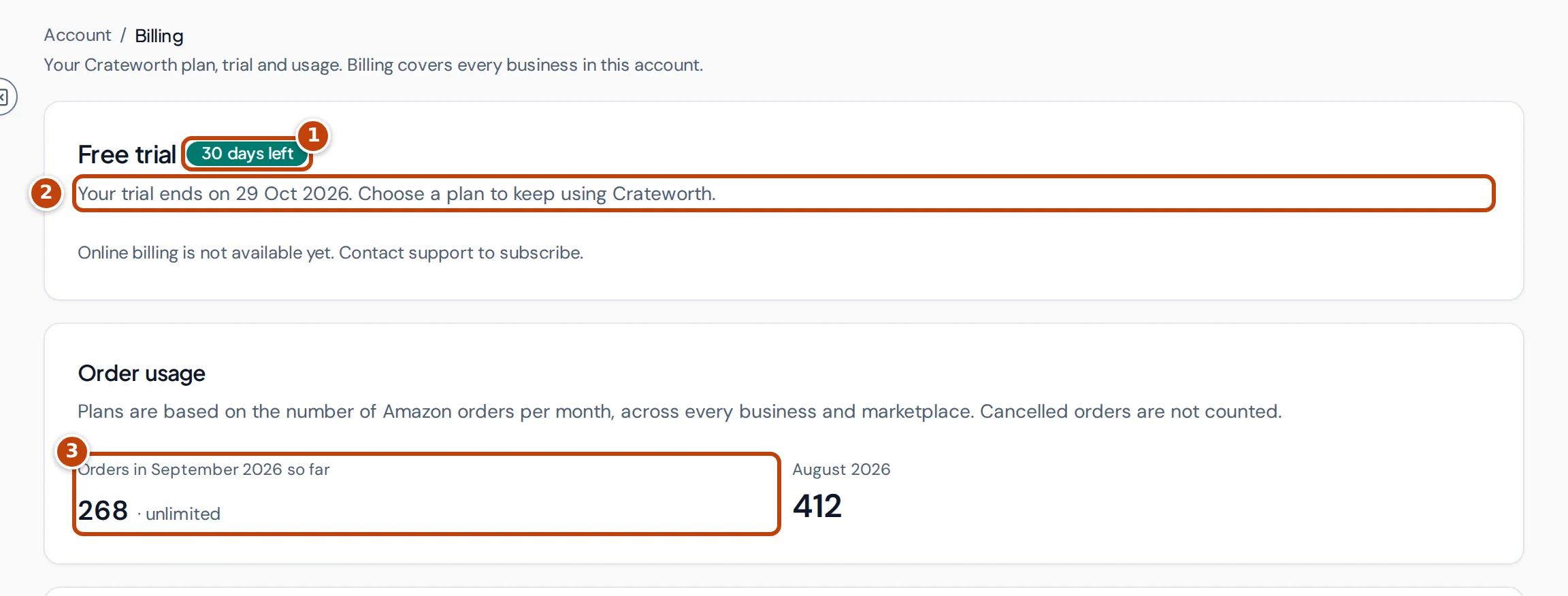
A new account starts with a free trial. The first card shows Free trial with the days left marker 1 and the date it ends marker 2. Choose a plan before then to keep using Crateworth. Below it, Order usage marker 3 counts this month’s Amazon orders so far.
If the page says “Online billing is not available yet. Contact support to subscribe.”, plans can’t be bought on the page yet; contact support instead.
Order usage
Section titled “Order usage”Plans are based on the number of Amazon orders per month, across every business and marketplace in the account. Cancelled orders aren’t counted. Months are calendar months.
The Order usage card shows this month’s orders so far and last month’s total. When your plan has an order limit, the figure shows the limit and a bar:
- Approaching your limit. appears from 80% of the limit.
- Limit reached. appears at 100%.
When the account has more than one business, a table splits the orders by business. A closed business’s orders still count for the months it was open.
Included features and AI credits
Section titled “Included features and AI credits”Features that use paid services have an allowance on every plan, shared by the account’s businesses. The Included features card shows how much of each you’ve used:
- Tracked keywords: keywords being tracked now.
- Container tracking starts: this month, or during the trial.
- AI credits: this month, or during the trial.
During the trial, these allowances open once you connect your Amazon seller account; the card says so until then.
AI credits cover every AI feature: 1 credit per invoice or expense document read, 1 per listing analysis, and 1 per 100 bank transactions categorised, rounded up for each import. Matching bank statement columns is free.
Choose a plan
Section titled “Choose a plan”When plans are available, the Plans section lists them, smallest first. Each plan shows its order limit, for example “Unlimited orders” or a monthly limit, and its price. Recommended marks the smallest plan that covers the higher of this month’s and last month’s orders. A table under the plans compares what each includes: Amazon orders a month, Businesses, People, Tracked keywords, Container tracking starts and AI credits.
- On the Billing page, select Choose plan on the plan you want. Crateworth opens a secure checkout.
- Enter your payment details and confirm.
- You come back to Billing, which shows “Payment received. Activating your plan…” until the plan is active.
If you leave the checkout without paying, the page says “Checkout was cancelled. You have not been charged.”
Change your plan
Section titled “Change your plan”- On the Billing page, select Switch to this plan on the plan you want.
- Check the summary. It shows what changes, and the cost: an amount added to your next invoice for the rest of the billing period when you move up, or a credit for unused time when you move down. It also shows your next invoice amount and date.
- Select the switch button to confirm, or Keep current plan.
A smaller plan can’t be chosen while the account has more businesses, people or tracked keywords than that plan allows. Close businesses, remove people or tracked keywords first, or choose a larger plan.
Payments, invoices and cancelling
Section titled “Payments, invoices and cancelling”While you’re subscribed, the first card shows your plan, when it renews (or ends, if you’ve cancelled), your Next payment and Payment method. A card that expires this month or next is flagged, because it could make the next payment fail.
- Manage subscription opens the billing portal, where you manage your subscription and payment method.
- Cancel plan opens the billing portal at the cancellation step. After you cancel, the first card says the date the plan ends.
When a payment fails or access ends
Section titled “When a payment fails or access ends”- Payment failed: Crateworth couldn’t take your last payment. You keep access while the payment is retried. Select Update payment method to fix it.
- Your free trial has ended or Your subscription has ended: choose a plan to regain access to your data. Until you do, Crateworth opens Billing in place of other pages; the Businesses page stays available, and the page has a Sign out button.
Amazon data keeps syncing for 3 days after the trial or subscription ends, so nothing is missed if you subscribe within that time. After that, syncing pauses. When you subscribe, syncing resumes straight away and the missed orders, fees and other history are recovered; the page shows the recovery for two weeks. Inventory levels for the paused days can’t be recovered, and Amazon Ads reports are recovered for up to the last 90 days.